 by
by 
While working with high-level C++ applications, it is easy to lose sight of where the program is getting all its memory chunks from. In a previous post, Understanding C++ Memory Layout for Systems Programming, I discussed the memory map of a typical C++ program. Here, we will put the theory into practice and check where objects are stored within a running process’s virtual address space. In this post, I will take a closer look at Linux memory management, scrutinize the various allocations that are happening in a C++ program, use Linux memory management tools, and verify whether the objects are located in the expected memory regions.
In this context, some of the Linux memory management concepts discussed here relate to those covered in my past posts, Linux Memory Management Part I and Linux Memory Management Part II. We will also cover how a child process is created in a C++ program on Linux, how and where the child process gets its memory from, and how its memory relates to its parent’s. We will examine the relationship between virtual and physical addresses in both processes.
Looking into the memory map
Each running C++ process on Linux has a memory map attached to it, and it can be examined in the /proc file system under /proc/<pid>/maps. Let’s take a look at the following small C++ code and see how we can look into the memory map of the program:
// hello_world.cpp
#include <iostream>
#include <unistd.h>

int main()
{
    std::cout << "Hello World\n";
    std::cout << "My PID: " << getpid() << "\n";

    sleep(60);

    return 0;
}
Compile and Run
$ g++ -std=c++20 -O0 -g -Wall -Wextra -Wpedantic \
    hello_world.cpp -o hello_world
$ ./hello_world
Hello World
My PID: 391180
Inspect the memory map on a second terminal
This program sleeps for 60 seconds, and that is the time you have to open a second terminal and inspect the memory map as follows:
$ cat /proc/391180/maps

00400000-00401000 r--p 00000000 08:02 19575481 /home/vbhadra/linux_memory_management/hello_world
00401000-00402000 r-xp 00001000 08:02 19575481 /home/vbhadra/linux_memory_management/hello_world
00402000-00403000 r--p 00002000 08:02 19575481 /home/vbhadra/linux_memory_management/hello_world
00403000-00404000 r--p 00002000 08:02 19575481 /home/vbhadra/linux_memory_management/hello_world
00404000-00405000 rw-p 00003000 08:02 19575481 /home/vbhadra/linux_memory_management/hello_world
26813000-26834000 rw-p 00000000 00:00 0        [heap]
7fffe48b8000-7fffe48d9000 rw-p 00000000 00:00 0 [stack]
Notice that the hello_world program is printing its PID (391180 in this case) using the getpid() system call, and then in the second terminal we are using the same PID in the cat /proc/391180/maps command to inspect the memory map of the program. The output has been shortened to fit in the window. If you see too much output on the console, which is difficult to inspect, you can alternatively use the less command as well.
Creating a child process
Now, let’s complicate our program a bit and see how we can create a child process in a C++ program using Linux system calls. We will use the fork() system call to create a child process from within C++ code. The system call fork() returns the following values:
| Value | Interpretation |
| -1 | fork() call failed |
| 0 | the code is executing inside the child process |
| Non-zero positive value | The code is executing in the parent process, and the value represents the child PID. |
Getting the current process ID
One other system call we will use is getpid(), which returns the PID of the current process. So,
- When called by the parent, it returns the parent’s PID.
- When called by the child, it returns the child’s PID.
Now, let’s take a look at the following program:
// create_child_process.cpp
#include <cerrno>
#include <cstdio>
#include <cstdlib>
#include <iostream>
#include <sys/wait.h>
#include <unistd.h>

int main()
{
    const pid_t fork_result = fork();

    if (fork_result == -1)
    {
        std::perror("fork");
        return EXIT_FAILURE;
    }

    if (fork_result == 0)
    {
        std::cout << "Child: my PID is " << getpid()
                  << ", my parent's PID is " << getppid()
                  << '\n';
        return EXIT_SUCCESS;
    }

    std::cout << "Parent: my PID is " << getpid()
              << ", my child's PID is " << fork_result << '\n';

    // Wait for the child to finish and collect its exit status.
    int status = 0;
    while (waitpid(fork_result, &status, 0) == -1)
    {
        if (errno != EINTR)
        {
            std::perror("waitpid");
            return EXIT_FAILURE;
        }
    }

    return EXIT_SUCCESS;
}
Compile and Run
$ g++ -std=c++17 -O0 -g -Wall -Wextra -Wpedantic create_child_process.cpp -o create_child_process
$ ./create_child_process
Parent: my PID is 902693, my child's PID is 902694
Child: my PID is 902694, my parent's PID is 902693
Waiting for a child process
The program prints both the child PID and the parent PID. We have used the waitpid() system call to wait for the child to finish. Here is how it works:
waitpid(fork_result, &status, 0) waits for the specified child process to finish.
fork_result: the child’s PID, when executing in the parent code.&status: status of how the child process finished.0: waits without requesting notifications when the child stops or resumes.
After the child terminates, a successful call returns the child’s PID and collects its termination information. This removes the child’s zombie entry in the system. The status variable stores this information in an encoded form. You can use WIFEXITED(status) to check whether the child terminated normally. If it returns true, you can use WEXITSTATUS(status) to obtain the child’s exit status.
If waitpid() returns -1, check errno. If it is EINTR, the call was interrupted by a signal and should be retried.
Keep the child alive
In the previous program, we let the child run for only 60 seconds, which is fine, but sometimes not enough to inspect the child. So let’s increase the child’s sleep time a bit more:
// Keep the child alive for inspection.
sleep(180);
Compile and Run
g++ -std=c++17 -Wall -Wextra -Wpedantic \
    inspect_child_process.cpp -o inspect_child_process
./inspect_child_process
Parent: my PID is 97194, my child's PID is 97195
Child: my PID is 97195, my parent's PID is 97194
In child process
Inspect the child with ps
Note the child PID from the console; in this example run, the child PID is 97195. We will use the ps command to find out some basic information about the child process using its PID. Open a second terminal and issue the following command:
$ ps -p 97195 -o pid,ppid,stat,comm
    PID    PPID STAT COMMAND
  97195   97194 S+   inspect_child_p
S+:
S means interruptible sleep. Both a timed sleep and waiting for a child
    can produce this state.
+ means the process belongs to the terminal’s foreground process group.
Introducing a stack variable
Now, we are going to introduce a stack variable in the parent, then try to modify the variable in the child and see if that has any impact on the parent’s copy. So we will add the following in the main function before creating the child process:
int measurement = 100;And in the child process, we will modify the variable as below:
    if (fork_result == 0)
    {
        std::cout << "Child: initial measurement = " << measurement << '\n';

        measurement = 250;

        std::cout << "Child: changed measurement = " << measurement << '\n';

        return EXIT_SUCCESS;
    }
The full source code can be found here.
Compile and Run
$ g++ -std=c++17 -Wall -Wextra -Wpedantic \
    child_variable_copy.cpp -o child_variable_copy
./child_variable_copy
Child: initial measurement = 100
Child: changed measurement = 250
Parent: measurement after child finishes = 100
From the output, it is evident that the child’s modification of the stack variable measurement didn’t impact the parent’s value. The reason is that initially the child inherits and shares physical page that backs the parent’s stack variables. But the moment it tries to modify the variables, a separate copy of the underlying memory is created by the OS, and the modification happens in the copy, not in the parent’s memory. This is known as copy-on-write (COW).
Compare Virtual Addresses
Now we know that the parent and the child have their own copy of the underlying memory holding the measurement variable, but what about their respective virtual addresses? Let’s print their virtual addresses in the next step and observe. To do that, we can simply print the address of the variable measurement using the & operator both in the child and the parent. So we will add the following lines in the child code:
std::cout << "Child: measurement = " << measurement << ", address = "
          << &measurement
          << '\n';
and the following in the parent code:
std::cout << "Parent: measurement = " << measurement << ", address = "
          << &measurement << '\n';
The full source code can be found here.
Compile and Run
$ g++ -std=c++17 -O0 -Wall -Wextra -Wpedantic \
    child_variable_address.cpp -o child_variable_address
./child_variable_address
Child: measurement = 250, address = 0x7ffea62c9848
Parent: measurement = 100, address = 0x7ffea62c9848
From the output, it looks like the measurement variable has the same virtual address (0x7ffea62c9848) in both the parent and child processes. This is because the child gets a copy of the parent’s virtual address space.
Comparing Physical Addresses
After looking at the virtual addresses of the parent and the child process, the natural question is what about the underlying physical memory and the respective physical addresses that are mapped to the virtual addresses. In the next example, we are going to print the physical addresses attached to the stack variable measurement in both the parent and the child.
The function below calculates the physical address and prints it to the console:
void print_physical_address(const void* address)
{
    const long result = sysconf(_SC_PAGESIZE);
    if (result <= 0)
    {
        std::cerr << "Cannot determine page size\n";
        return;
    }

    const auto page_size = static_cast<std::uint64_t>(result);
    const auto virtual_address =
        reinterpret_cast<std::uintptr_t>(address);

    const int fd = open("/proc/self/pagemap", O_RDONLY);
    if (fd == -1)
    {
        std::perror("open pagemap");
        return;
    }

    const auto entry_offset =
        static_cast<off_t>((virtual_address / page_size) *
                           sizeof(std::uint64_t));

    std::uint64_t entry = 0;
    ssize_t bytes_read;

    do
    {
        bytes_read = pread(fd, &entry, sizeof(entry), entry_offset);
    } while (bytes_read == -1 && errno == EINTR);

    if (bytes_read == -1)
    {
        std::perror("pread pagemap");
        close(fd);
        return;
    }

    close(fd);

    if (bytes_read != static_cast<ssize_t>(sizeof(entry)))
    {
        std::cerr << "Incomplete pagemap entry\n";
        return;
    }

    // Bit 63 indicates whether the page is resident in RAM.
    if ((entry & (std::uint64_t{1} << 63)) == 0)
    {
        std::cout << "Page is not resident in RAM\n";
        return;
    }

    // Bits 0–54 contain the physical page frame number.
    const auto frame_number = entry & ((std::uint64_t{1} << 55) - 1);

    if (frame_number == 0)
    {
        std::cout << "PFN is zero; physical address unavailable"
                  << " (normally hidden without permission)\n";
        return;
    }

    const auto physical_address =
        frame_number * page_size + virtual_address % page_size;

    std::cout << "Physical address: 0x" << std::hex
              << physical_address << std::dec << '\n';
}
The complete source code can be found here.
Compile and Run
$ g++ -std=c++17 -O0 -Wall -Wextra -Wpedantic \
    child_physical_address.cpp -o child_physical_address

sudo ./child_physical_address
Parent: measurement = 100, virtual address = 0x7ffc37a43e78
Physical address: 0x118cfce78
Child: measurement = 100, virtual address = 0x7ffc37a43e78
Physical address: 0x3ab2d5e78
Notice the physical addresses of the measurement variable in the parent and the child processes are not the same, even though the virtual addresses are the same. As discussed earlier, the moment the child tries to modify the measurement variable, a copy of the underlying physical page is created for the child, and the modification happens there.
Where is your stack memory?
We have been claiming that the variable measurement is in the stack section of the process address space. But how do we actually prove that it is indeed coming from the stack? To prove it, we need to find out the stack address range and then check if the virtual address of the variable measurement is coming from there.
// inspect_child_stack.cpp
#include <cerrno>
#include <cstdio>
#include <cstdlib>
#include <iostream>
#include <sys/wait.h>
#include <unistd.h>

int main()
{
    int measurement = 100;

    const pid_t fork_result = fork();

    if (fork_result == -1)
    {
        std::perror("fork");
        return EXIT_FAILURE;
    }

    if (fork_result == 0)
    {
        measurement = 250;

        std::cout << "Child PID: " << getpid() << "\nmeasurement = " << measurement
                  << "\nVirtual address: " << &measurement << '\n'
                  << std::flush;

        sleep(180);

        return EXIT_SUCCESS;
    }

    std::cout << "Parent PID: " << getpid() << "\nmeasurement = " << measurement
              << "\nVirtual address: " << &measurement << '\n'
              << std::flush;
    int status = 0;
    while (waitpid(fork_result, &status, 0) == -1)
    {
        if (errno != EINTR)
        {
            std::perror("waitpid");
            return EXIT_FAILURE;
        }
    }

    return EXIT_SUCCESS;
}
Compile and Run
We will use the above sample code for this illustration. Compile the code in one terminal and then run it as below:
Terminal 1
$ g++ -std=c++17 -O0 -g -Wall -Wextra -Wpedantic \
    inspect_child_stack.cpp -o inspect_child_stack
./inspect_child_stack
Parent PID: 158536
measurement = 100
Virtual address: 0x7ffdfb4e0268
Child PID: 158537
measurement = 250
Virtual address: 0x7ffdfb4e0268
This gives you the PIDs of the parent and the child process, as well as the virtual addresses of the variable measurement in the respective processes. Now, from the earlier discussion in this post, we saw how the whole memory map of a process can be found from its /proc/<pid>/maps entry of the process. We can find the stack address range using the following command in a second terminal while the process is still running:
Terminal 2
$ grep '\[stack\]' /proc/158537/maps
7ffdfb4c2000-7ffdfb4e3000 rw-p 00000000 00:00 0    [stack]

$ grep '\[stack\]' /proc/158536/maps
7ffdfb4c2000-7ffdfb4e3000 rw-p 00000000 00:00 0    [stack]
From the console prints in terminal one, the PID of the parent process is 158536, and the PID of the child process is 158537. We have used these PID values to access the memory map of each of the processes, and then filtered it with “stack” to print the stack range from the /proc/<pid>maps entry. Also, from the console prints on terminal one, the virtual address of the measurement variable is 0x7ffdfb4e0268 for both processes. If you compare the virtual address value 0x7ffdfb4e0268 in each of the ranges, you will see it falls within the stack address ranges of each process.
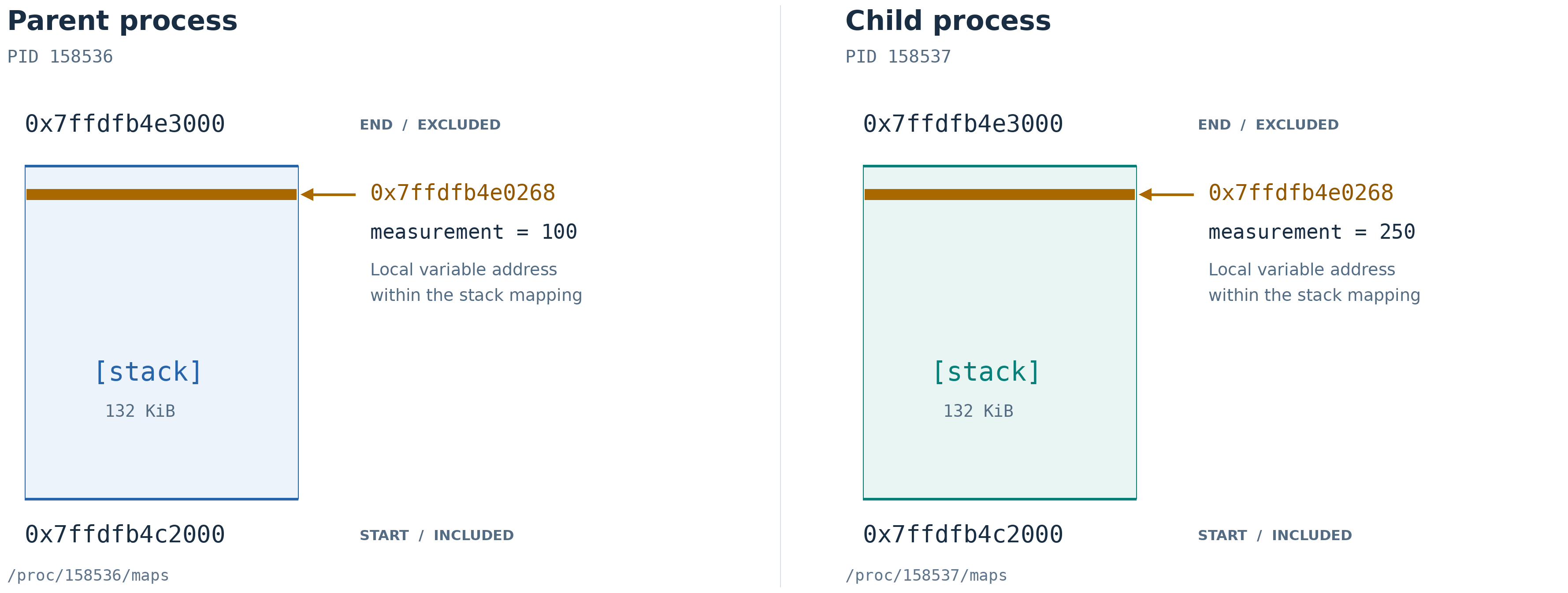
From the diagram above, it should be evident that the virtual address of the variable measurement falls within the boundaries of the stack memory section of the respective processes (parent and the child).
Examining dynamically allocated memory addresses
Now that we have settled our discussion on the stack variable, let’s turn our focus to the dynamically allocated memory and its addresses. In the following sample code, we will allocate a memory chunk using dynamic allocation, print the dynamically allocated memory address, and then read /proc/<pid>/maps to find out the process memory map and check whether the dynamically allocated address value falls within the heap mapping.
#include <cerrno>
#include <cstdio>
#include <cstdlib>
#include <iostream>
#include <memory>
#include <sys/wait.h>
#include <unistd.h>

int main()
{
    auto measurement = std::make_unique<int>(100);

    const pid_t fork_result = fork();

    if (fork_result == -1)
    {
        std::perror("fork");
        return EXIT_FAILURE;
    }

    if (fork_result == 0)
    {
        *measurement = 250;

        std::cout << "Child PID: " << getpid() << "\nmeasurement = " << *measurement
                  << "\nInteger's virtual address: " << measurement.get() << '\n'
                  << std::flush;

        sleep(60);

        return EXIT_SUCCESS;
    }

    int status = 0;
    while (waitpid(fork_result, &status, 0) == -1)
    {
        if (errno != EINTR)
        {
            std::perror("waitpid");
            return EXIT_FAILURE;
        }
    }

    std::cout << "Parent: measurement = " << *measurement << '\n';

    return EXIT_SUCCESS;
}
Instead of allocating the measurement variable on the stack, we are now allocating it on the heap using make_unique() C++ utility.
Compile and Run
$ g++ -std=c++17 -O0 -g -Wall -Wextra -Wpedantic \
    inspect_child_heap.cpp -o inspect_child_heap
./inspect_child_heap
Child PID: 188343
measurement = 250
Integer's virtual address: 0x3c84a2b0
As you can see, the virtual address of the dynamically allocated variable measurement is 0x3c84a2b0. Now, like earlier, open a second terminal and check the heap address range as follows:
$ grep '\[heap\]' /proc/188343/maps
3c838000-3c859000 rw-p 00000000 00:00 0    [heap]
By comparing the virtual address of the dynamically allocated memory printed on the terminal one console print with the start and the end addresses of the heap memory section, we can say the dynamically allocated memory is indeed coming from the heap section of the child process. You can verify the same for the parent process as well.

Inspecting Global Address of a process
Now, the one other type of variable you may have in a process is global data that comes from the data section. So, in the last part of this post, we will examine where the global variable address comes from.
#include <cerrno>
#include <cstdio>
#include <cstdlib>
#include <iostream>
#include <sys/wait.h>
#include <unistd.h>

int measurement_limit = 100;

int main()
{
    const pid_t fork_result = fork();

    if (fork_result == -1)
    {
        std::perror("fork");
        return EXIT_FAILURE;
    }

    if (fork_result == 0)
    {
        measurement_limit = 250;

        std::cout << "Child PID: " << getpid() << "\nmeasurement_limit = " << measurement_limit
                  << "\nVirtual address: " << &measurement_limit << '\n'
                  << std::flush;

        sleep(60);

        return EXIT_SUCCESS;
    }

    int status = 0;
    while (waitpid(fork_result, &status, 0) == -1)
    {
        if (errno != EINTR)
        {
            std::perror("waitpid");
            return EXIT_FAILURE;
        }
    }

    std::cout << "Parent: measurement_limit = " << measurement_limit << '\n';

    return EXIT_SUCCESS;
}
Compile and Run
Child PID: 194215
measurement_limit = 250
Virtual address: 0x404088
Terminal 2
Now, unlike the stack and the heap memory sections, there is no data label in the process’s memory map. First, grep the executable name string as below:
$ grep 'inspect_child_global' /proc/194215/maps
00400000-00401000 r--p 00000000 08:02 19575829
    /home/vbhadra/linux_memory_management/inspect_child_global
00401000-00402000 r-xp 00001000 08:02 19575829
    /home/vbhadra/linux_memory_management/inspect_child_global
00402000-00403000 r--p 00002000 08:02 19575829
    /home/vbhadra/linux_memory_management/inspect_child_global
00403000-00404000 r--p 00002000 08:02 19575829
    /home/vbhadra/linux_memory_management/inspect_child_global
00404000-00405000 rw-p 00003000 08:02 19575829
    /home/vbhadra/linux_memory_management/inspect_child_global
Now look into the permissions on each entry. The global data section has read-write permission and hence has the rw-p attribute in the list. The executable code is located with the permission of read and execute permissions (r-xp). The rest are readable sections.

So that’s all about a running process’s memory for now; more on this coming soon.
Discover more from Tech For Talk
Subscribe to get the latest posts sent to your email.
Leave a Reply