 by
by 
Introduction
The Linux kernel manages physical memory while supporting multiple applications and kernel operations. This blog explains how physical memory is organized into fixed-size blocks called pages and how the kernel records information about each page. It also introduces Linux memory zones and explains how hardware addressing constraints affect the pages available for particular memory allocations.
Continue the series Linux Memory Management Part IIDiscussing Physical Memory
- Memory allocation in the kernel differs from allocation in user-space.
- The kernel operates under stricter constraints and has fewer memory-management conveniences.
- Kernel code may have limited options for recovering from allocation failures.
- Some kernel operations cannot pause or sleep while waiting for memory.
- Kernel allocation mechanisms must therefore be efficient and lightweight.
- Understanding kernel memory management helps application developers to:
- diagnose performance problems
- interpret out-of-memory conditions
- reduce unnecessary memory usage
- better understand how the applications interact with the operating system.
Pages
- The Linux kernel manages physical memory in fixed-size blocks called pages.
- A processor can access individual bytes or words, but the MMU (Memory Management Unit) normally manages memory at page-level granularity.
- The MMU translates virtual addresses into corresponding physical addresses.
- Page tables store the information required for these address translations.
- In virtual memory management, a page is the smallest meaningful unit handled by the kernel.
- Understanding pages helps application developers interpret page faults, memory usage, mapping behaviour and application performance.
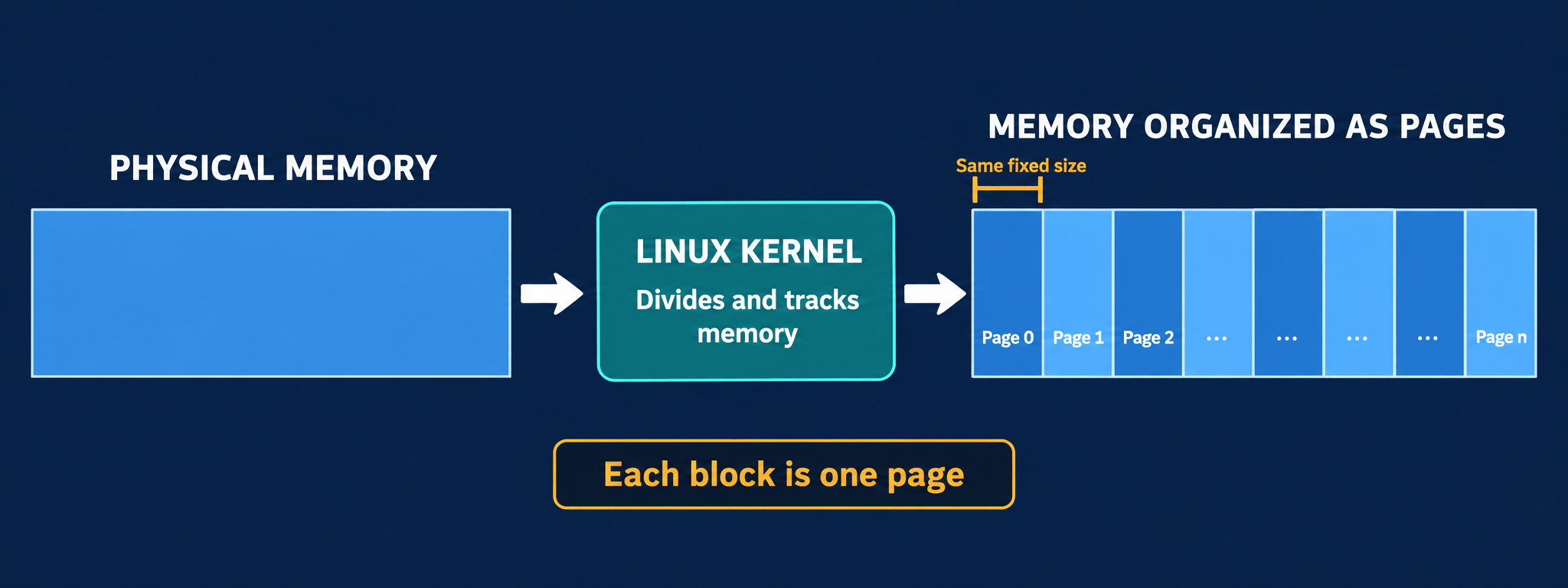
Page Size
- Page size depends on the processor architecture and, in some cases, the kernel configuration.
- Some architectures support several page sizes, including larger pages for particular workloads.
- A common base page size is 4 KiB, including on most modern 32-bit and 64-bit systems.
- With 1 GiB of physical memory and 4 KiB pages, memory contains 262,144 pages:
- 1 GB / 4 KB = 262,144
- Most 64-bit architectures use 8 KiB pages as well as 4 KiB depending on the configuration.
Page struct
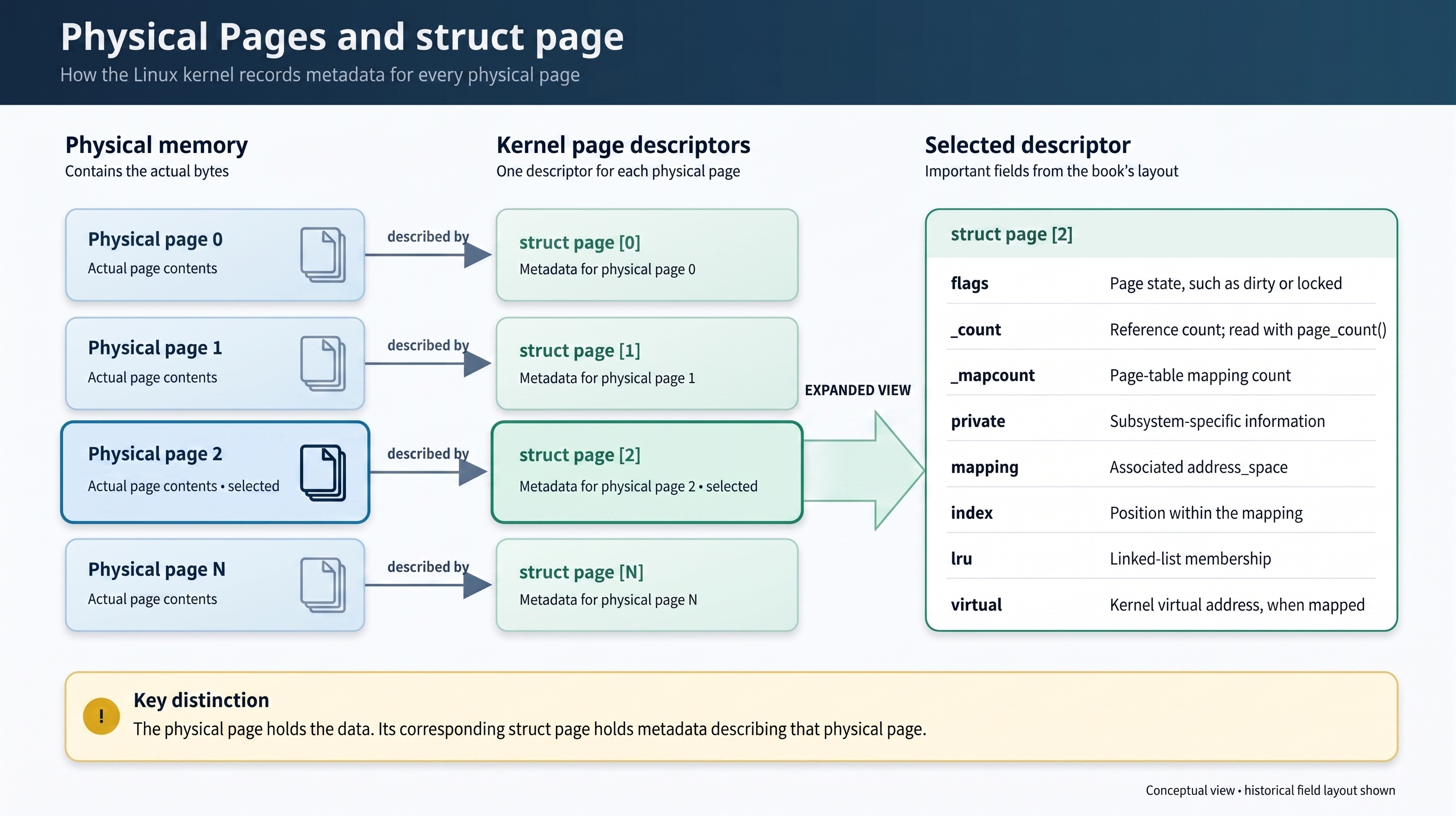
The kernel represents every physical page on the system with a struct page structure.
struct page {
        unsigned long           flags;
        atomic_t                _count;
        atomic_t                _mapcount;
        unsigned long           private;
        struct address_space    *mapping;
        pgoff_t                 index;
        struct list_head        lru;
        void                    *virtual;
};
Important fields in struct page
flagsrecords the page’s current state. Individual bits indicate properties such as whether the page is dirty, locked or active._countrecords how many references exist to the page.page_count()returns 0 when the page is free. It returns a positive value when the page is in use.mappingpoints to the associated address_space when the page contains cached data.privatecan point to additional information maintained by a kernel subsystem.- A physical page may be mapped into a process’s virtual address space through its page table.
virtualcontains the page’s kernel virtual address when a permanent mapping exists.
Relevance of Physical Page Descriptor
- Each struct page represents a physical page frame.
- It describes the current state and use of that physical page.
- It does not describe the actual data stored in the page.
- The association between data and a particular physical page can change. For example, data may be moved during swapping and later loaded into a different physical page.
The kernel maintains a struct page for every physical page so that it can determine:
- Whether the page is free
- Whether the page is allocated
- Which kernel component or process is using it
A physical page may contain:
- Data belonging to a user-space process
- Dynamically allocated kernel data
- Kernel code or static kernel data
- Cached file data
- Other kernel-managed information
Finding Basic page information
System page size
To find the page size of a Linux system we can use a tool called getconf.
$ getconf PAGE_SIZE

4096
Proc Interface
$ grep -E 'MemTotal|MemFree|MemAvailable' /proc/meminfo

MemTotal:       16188880 kB

MemFree:          888556 kB

MemAvailable:    6130188 kB
Memory Zones
- The kernel cannot use every physical page for every purpose because some hardware has memory-addressing restrictions.
- Linux divides physical memory into zones.
- Each zone groups pages that have similar accessibility and hardware characteristics.
- This allows the kernel to select pages that meet the requirements of a particular operation.
Why Memory Zones?
Not all physical pages are suitable for every type of allocation. There are primarily two constraints that force the Linux kernel to organize the pages into separate zones:
- DMA address limits: Some devices can transfer data only to or from a limited range of physical addresses. Memory allocated for such a device must come from pages within that range.
- Limited kernel virtual-address space: On some architectures, the kernel cannot keep all physical memory permanently mapped into its virtual address space. To access a page outside the directly mapped region, the kernel must first create a temporary mapping.
Linux Memory Zones
Linux divides physical memory into zones because hardware devices and processor architectures do not all have the same memory-access capabilities.
ZONE_DMA
- Contains pages reserved for devices with restricted DMA addressing.
- On x86 systems, this commonly covers the first 16 MB of physical memory because legacy ISA devices cannot access memory above this range.
ZONE_DMA32
- Contains pages suitable for DMA operations by devices limited to 32-bit addresses.
- These pages are normally located within the first 4 GiB of physical memory, making them accessible to devices that use 32-bit DMA addresses.
- The size and use of this zone depend on the architecture.
ZONE_NORMAL
- Contains pages that are permanently and directly mapped into the kernel’s virtual address space.
- It is used for ordinary kernel memory allocations.
ZONE_HIGHMEM
- Contains physical pages that are not permanently mapped into the kernel’s address space.
- The kernel must map these pages temporarily when it needs to access them.
- This zone is mainly relevant to architectures where physical memory can exceed the kernel’s directly addressable virtual-memory range.
Variation due to architecture
- The presence, size and purpose of each zone are architecture-dependent.
- If an architecture allows DMA to access all physical memory, ZONE_DMA may be empty and DMA allocations may come from ZONE_NORMAL.
- Some older PCI devices have a restricted DMA implementation and can generate only 24-bit addresses.
- They can therefore directly access memory only within the first 16 MiB of physical memory, because 224 bytes equals 16 MiB.
Example of address restrictions
Some legacy ISA devices can use only 24-bit physical addresses for DMA. Therefore, they can directly access only the first 224 bytes of physical memory.
224 = 210 × 210 × 24 = 1 KiB × 1 KiB × 16 = 16 MiB
Such a device can perform DMA only within the first 16 MiB of physical memory. Linux maintains ZONE_DMA on relevant architectures so that suitable pages can be allocated within this address range.
32-Bit Address Space: Key Memory Facts
- A 32-bit address contains 32 binary bits and can represent 232 unique addresses.
- In a byte-addressable system, a 32-bit physical address space can accommodate: 232 bytes=4 GiB
- The physical address range is: 0x00000000 to 0xFFFFFFFF
- A device limited to 24-bit DMA addressing can directly access buffers only within the first 16MB of physical memory.

References
Love, R. (2010). Linux Kernel Development (3rd ed.). Addison-Wesley Professional. Chapter 12: Memory Management.
Discover more from Tech For Talk
Subscribe to get the latest posts sent to your email.
1 Comment