Skip to content

Tech For Talk

a blog site for programmers

  • Cloud Computing
    • Parallel and Distributed Computing
      • Introduction to parallel computing
      • Introduction to Distributed Memory Programming Using MPI
      • Parallel Processing: Best Data Partitioning Strategies for Maximum Efficiency
      • Understanding Parallelism in Uni-Processor Systems
      • Introduction to Multi-Threaded Programming: Key Concepts
      • Using Pthreads: Synchronization with pthread_join() Explained
      • Problems
        • Pthread
          • Building a Multi-Threaded Task Queue with Pthreads
          • Simulating a Flash Sale Using Pthreads in C
        • MPI
          • Efficient Data Aggregation with MPI_Reduce in Distributed Systems
          • Efficient Shipping Time Calculation Using MPI Techniques
          • Optimizing MPI Communication with Ping-Pong Patterns
          • Understanding Vector Multiplication in C: MPI Implementation
    • Cloud Computing
      • Introduction to Cloud Computing
      • Introduction to Virtualisation
      • Introduction to Containers
      • Introduction to Container Orchestration
    • Big Data
      • Introduction to Data Analytics, Big Data, Hadoop and Spark
      • Set Up a Hadoop Cluster on AWS EMR: A Step-by-Step Guide
      • Characteristics of Big Data Systems
    • Networking Fundamentals
      • Interpretation of RFC 2080: RIPng for IPv6
      • Software Defined Networking (SDN)
  • Blogs
  • Online Books
    • C++ Templates
      • Chapter 1
      • Chapter 2
      • Chapter 3
      • Chapter 4
      • Chapter 5
      • Chapter 6
      • Chapter 7
  • Contact Us
Posted on May 17, 2020November 21, 2025

Setting up an AWS account

Unknown's avatar by vivekbhadra.In Cloud / AWS / DevOps.2 Comments on Setting up an AWS account

AWS accounts are free for a year. However, for specific services you might have to pay. But if you are beginning to work with AWS you might just avoid all the costs but still enjoy the services provided by the platform. So to start with let’s set up an account. TO set up an AWS account go to the below site and create an account:

https://aws.amazon.com/console/

Create an AWS account

Alternatively you can also go to https://aws.amazon.com/ and then click on Sign In to the Console button as below:

As you do not have an account already click on the Create a New AWS account button as below:

You will have to fill up the little form like below, type in your email address and choose a password for yourself:
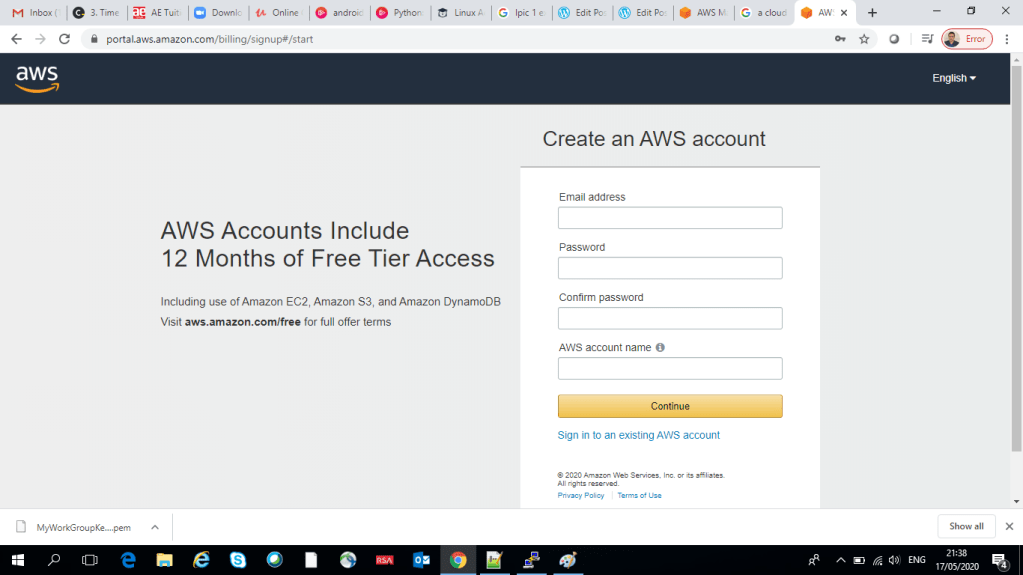
Fill up the form

Once you have typed in a password of you choice you will be asked to proved a account name, choose a name of your liking:

After you have filled up the above you will be asked to fill up some few more information. I will like to have this as a Personal account in the below form. Fill in you address and other personal details in the below like form when asked:
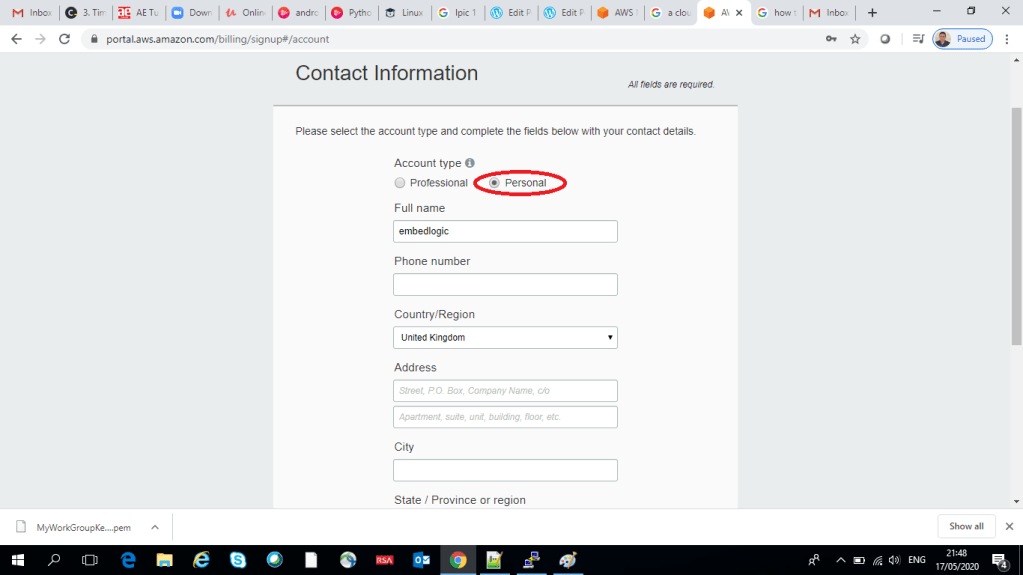
Once you have filled up all the information and agreed to the terms and condition of AWS, you will see the Create Account and Continue button activated, click it:

Then you will hit into another page were they will ask for your credit card detail. And here comes the big disclaimer, fill in your card details at your own discretion, I won’t be able to take any responsibility for identity theft! When you are done click on Verify and Add button. In the next page you have to confirm your identity by entering your phone number, typing the letters you can see on the screen and then click on the Send SMS. They will send you an SMS on you supplied phone number and then ask to confirm the code which has been send by the SMS as below:

Now, type in the code and click on Verify and Continue as below:
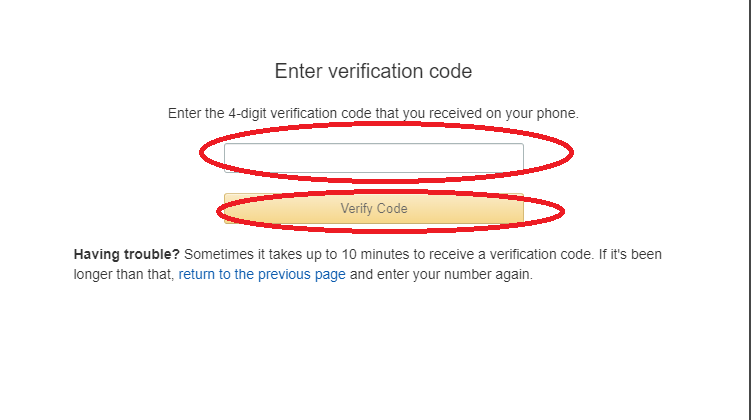
Now you will be presented with a screen with different plan options, my chosen plan is Basic Plan which is free:

Click on the Free button (unless you want to really pay them, really!) and your shiny brand new AWS account is created and you can now login into you account:
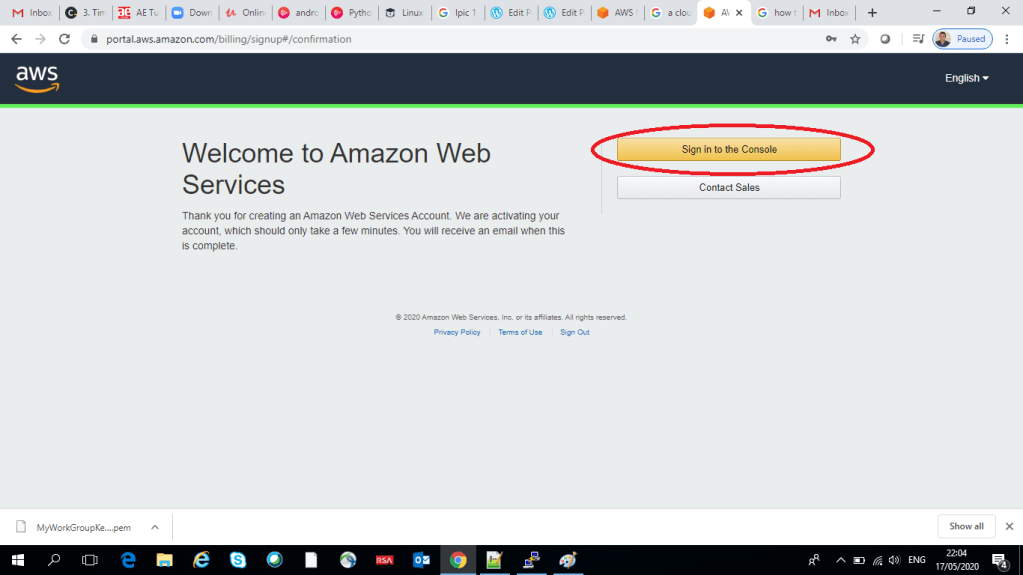
Click on Sign in to the console as below:
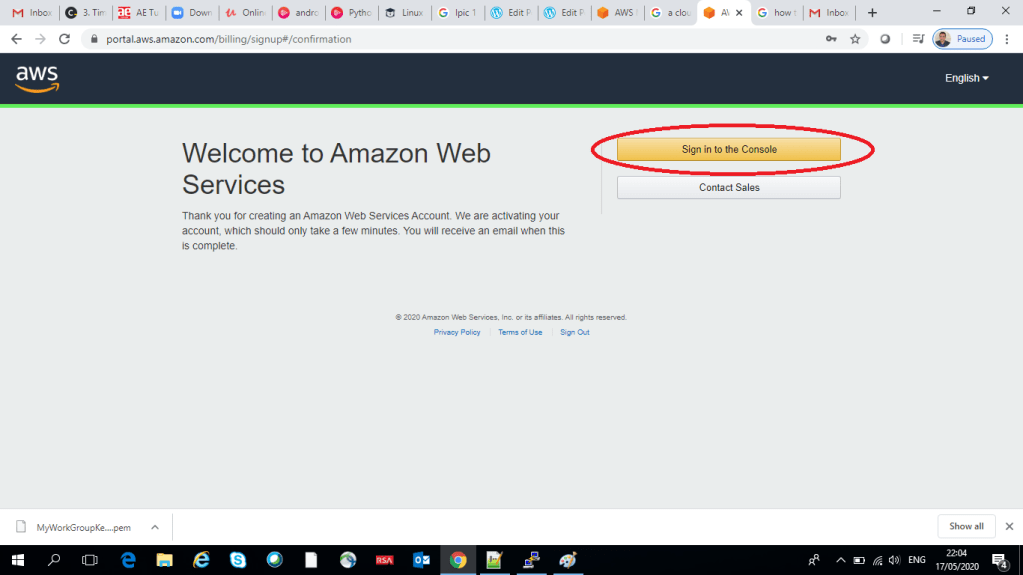
Now you are at the AWS sign in page, leave the default choice Root user, type in your user name which is your email address as provided before, click on Next, type in your password in the below login page:

Now if you have typed in correctly your user name and password you should have been able to see below AWS console page:
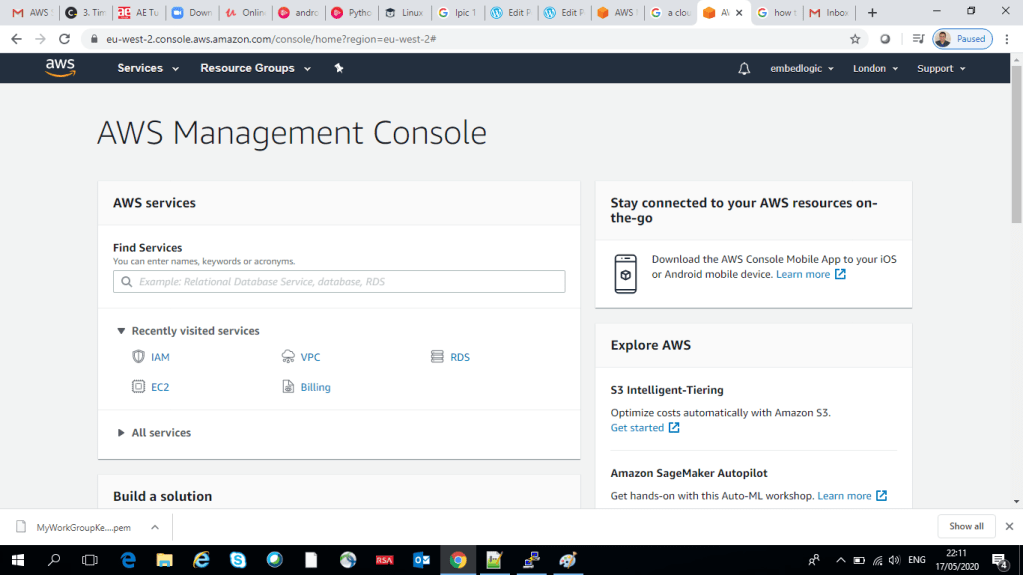
In the next blog I will talk about how to configure your AWS account, activate your double security with MFA, creating a user for day to day work and so on. So stay tuned.

That’s all for this blog, have fun!

Share this:

  • Click to email a link to a friend (Opens in new window) Email
  • Tweet
  • Click to share on Reddit (Opens in new window) Reddit
  • Pocket
  • Click to print (Opens in new window) Print
  • Share on Tumblr
Like Loading...

Related

AWSAWS Account SetupCloudCloud Technology

2 Comments

  1. Nivedita Bhadra's avatar Nivedita Bhadra says:
    May 17, 2020 at 11:00 pm

    Thanks for the post! Really helpful.

    LikeLike

    Reply
  2. Pingback: Configure your AWS account – Tech For Talk

Leave a reply to Nivedita Bhadra Cancel reply

This site uses Akismet to reduce spam. Learn how your comment data is processed.

Post navigation

Previous Previous post: C++ notes: Shallow copy, overloaded assignment operator and deep copy explained
Next Next post: Configure your AWS account

Categories

  • Linux Kernel Development (45)
  • C/C++ Programming (26)
  • Cloud / AWS / DevOps (25)
  • Embedded Systems & IoT (20)
  • AI/ML & Data Engineering (16)

Tags

  • AWS (16)
  • technology (16)
  • Cloud (15)
  • C++ Programming (11)
  • programming (10)

Year

  • 2025 (719)
  • 2024 (2)
  • 2023 (47)
  • 2022 (1)
  • 2021 (14)

Recent Posts: Tech For Talk

std::span C++20: When to Use (and NOT Use) for Safe Buffer Passing

Optimal C++ Containers for Performance Efficiency

BITS PILANI WILP Second Semester MTech in Cloud Computing Study Notes

BITS PILANI Assignments Second Semester M.Tech in Cloud Computing

Automating AWS Glue Workflows with EventBridge

Top Posts & Pages

  • std::span C++20: When to Use (and NOT Use) for Safe Buffer Passing
  • Optimal C++ Containers for Performance Efficiency
  • Home
  • Mastering Function and Class Templates in C++: A Complete Guide
  • Chapter 1 : Introduction to Templates in C++
  • Chapter 2 : Working with Function Templates in C++
  • Chapter 4 : Return type of template function in C++
  • Chapter 5 : Miscellaneous template aspects
  • Chapter 3 : All about Template Parameters in C++
  • Chapter 7 : Class Template Instantiation
Follow Tech For Talk on WordPress.com

Copyright Notice

© [Vivek Bhadra] and [https://vivekbhadra.wordpress.com], [2017]. Unauthorized use and/or duplication of this material without express and written permission from this site’s author and/or owner is strictly prohibited. Excerpts and links may be used, provided that full and clear credit is given to [Vivek Bhadra] and [https://vivekbhadra.wordpress.com] with appropriate and specific direction to the original content.

Create a website or blog at WordPress.com
  • Cloud Computing
    • Parallel and Distributed Computing
      • Introduction to parallel computing
      • Introduction to Distributed Memory Programming Using MPI
      • Parallel Processing: Best Data Partitioning Strategies for Maximum Efficiency
      • Understanding Parallelism in Uni-Processor Systems
      • Introduction to Multi-Threaded Programming: Key Concepts
      • Using Pthreads: Synchronization with pthread_join() Explained
      • Problems
        • Pthread
          • Building a Multi-Threaded Task Queue with Pthreads
          • Simulating a Flash Sale Using Pthreads in C
        • MPI
          • Efficient Data Aggregation with MPI_Reduce in Distributed Systems
          • Efficient Shipping Time Calculation Using MPI Techniques
          • Optimizing MPI Communication with Ping-Pong Patterns
          • Understanding Vector Multiplication in C: MPI Implementation
    • Cloud Computing
      • Introduction to Cloud Computing
      • Introduction to Virtualisation
      • Introduction to Containers
      • Introduction to Container Orchestration
    • Big Data
      • Introduction to Data Analytics, Big Data, Hadoop and Spark
      • Set Up a Hadoop Cluster on AWS EMR: A Step-by-Step Guide
      • Characteristics of Big Data Systems
    • Networking Fundamentals
      • Interpretation of RFC 2080: RIPng for IPv6
      • Software Defined Networking (SDN)
  • Blogs
  • Online Books
    • C++ Templates
      • Chapter 1
      • Chapter 2
      • Chapter 3
      • Chapter 4
      • Chapter 5
      • Chapter 6
      • Chapter 7
  • Contact Us
  • Comment
  • Reblog
  • Subscribe Subscribed
    • Tech For Talk
    • Already have a WordPress.com account? Log in now.
    • Tech For Talk
    • Subscribe Subscribed
    • Sign up
    • Log in
    • Copy shortlink
    • Report this content
    • View post in Reader
    • Manage subscriptions
    • Collapse this bar
 

Loading Comments...
 

    %d