 by
by APIs are the backbone of modern applications. Among the different approaches to building them, one of the most widely used is the RESTful API. In this blog, we will examine the fundamentals of how REST works. You will learn how to make use of it. To work with REST APIs effectively, you need to understand their structure. This knowledge is useful whether you are building a streaming platform, an online store, or a data service. We will begin by exploring the basics of REST. Then, we will walk through Create, Read, Update, and Delete (CRUD) operations. We will use a simple movie streaming example.
Why REST is Important?
REST, short for Representational State Transfer, has become the most common way of building APIs. It is simple, scalable and easy to understand.
Before we look at how REST works, it helps to understand CRUD, which stands for Create, Read, Update and Delete. These are the four basic actions almost every application needs when working with data. For example, on a movie platform, you might create a new film entry. You may read the list of titles. You can update the price of a rental. Alternatively, you might delete a film that is no longer available.
Where CRUD comes from
CRUD is a classic concept from database systems. It describes the four fundamental operations you can perform on persistent data:
- Create a record
- Read or retrieve a record
- Update a record
- Delete a record
Almost every data-driven system, whether it’s a database, file store, or API, relies on these operations. The key idea is that each HTTP verb maps directly to a CRUD operation:
- POST → Create a resource
- GET → Read data (a list or a single item)
- PUT/PATCH → Update an existing resource
- DELETE → Remove a resource
This predictable structure makes APIs easy to use and easy to integrate into cloud-native applications.
Structuring Resources
REST revolves around resources. Let’s take an example. Suppose we are working with a movie streaming service. At the base URL:
https://movies.com/api/streamingthe client can send a request, and the API might return something like this:
{
  "streaming": {
    "name": "StreamFlix",
    "location": "Online",
    "movies": [
      {
        "id": 1,
        "title": "Inception",
        "director": {
          "name": "Christopher Nolan",
          "birth_year": 1970,
          "nationality": "British-American"
        },
        "genre": {
          "name": "Sci-Fi",
          "description": "Science Fiction Movies"
        },
        "price": 3.99,
        "stock": 100
      }
    ]
  }
}
From this, you can see that the key resource of interest is movies. A collection of movies is available at /movies, and a single movie is accessed at /movies/{id}. All endpoints sit under the base URL.
This is how resources are typically structured on the server. When you query the base URL, the server responds with a JSON object. This object contains high-level information about the service, such as the streaming platform details. It also includes the resources it manages, like a list of movies.

From this response, you can see that the main resource of interest is movies. A collection of movies is available at /movies, and a single movie is accessed at /movies/{id}. All endpoints sit under the base URL.
In this structure:
- streaming groups information about the platform itself.
- name is the name of the service, here
"StreamFlix". - location describes where it is available, here
"Online". - movies is an array of movie objects, each with its own fields.
- Inside each movie:
- id is the unique identifier for the movie.
- title is the name of the movie.
- director is another object with details such as the director’s name, year of birth, and nationality.
- genre is an object describing the type of film and a short description.
- price is the cost to rent or stream the movie.
- stock shows how many copies or licences are available.
From this, you can see that the main resource of interest is movies. A collection of movies is available at /movies, and a single movie can be accessed at /movies/{id}. All endpoints sit under the base URL.
We need to make ourselves familiar with some of the terminologies in this context.
- Base URL: the root address of the API. All other paths are built on top of this. Example:
https://movies.com/api/streamingis the base URL for our service. - Endpoint: a specific address you can call within the API. For example,
/moviesis an endpoint that lists all movies./movies/1is another endpoint that returns just the movie with ID 1. Example:https://movies.com/api/streaming/moviesreturns all movies.https://movies.com/api/streaming/movies/1returns just the movie with ID 1.
- Path: the part that comes after the base URL. Example: In
https://movies.com/api/streaming/movies/1, the path is/movies/1. - Resource: the object you are working with, such as a movie. Example: In our case, a movie is the resource. The details like title, director, and genre belong to that resource.
- JSON structure: the format in which the server sends data back. JSON makes it easy for machines (and humans) to read the details. Example response for a single movie:
{
  "id": 1,
  "title": "Inception",
  "director": {
    "name": "Christopher Nolan",
    "birth_year": 1970,
    "nationality": "British-American"
  },
  "genre": {
    "name": "Sci-Fi",
    "description": "Science Fiction Movies"
  },
  "price": 3.99,
  "stock": 100
}
From this, you can see that the main resource of interest is movies. A collection of movies is available at the /movies endpoint, and a single movie is accessed at /movies/{id}. All endpoints sit under the base URL.
When to Use a Request Body?
A common point of confusion is when to include a request body. The rule is straightforward:
- GET → no body
- DELETE → no body
- POST → body required (you send the new resource details)
- PUT → body required (you send the updated resource details)
The body is just a JSON object that matches the structure of the resource. For movies, this means including fields such as title, director, genre, price and stock.
CRUD in Action
Let’s look at each operation in turn with examples.
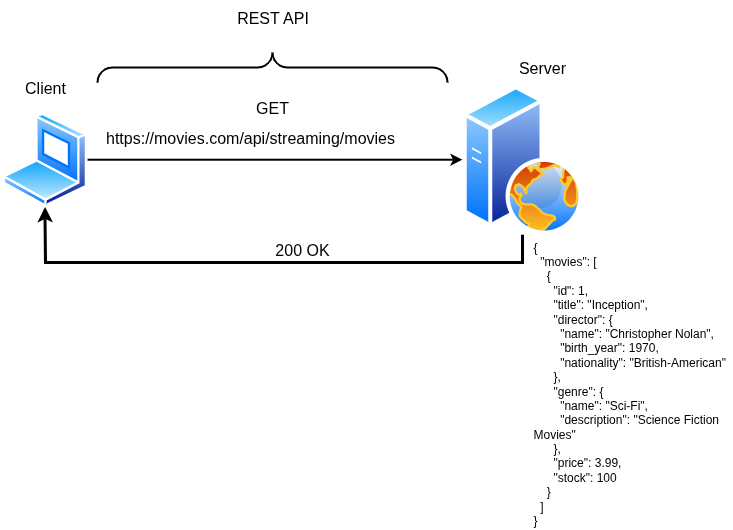
GET – Fetch all movies
This operation is a read action. We send a GET request to the /movies endpoint. This request asks the server to return the complete list of movies available on the platform.
GET https://movies.com/api/streaming/moviesResponse (200 OK):
[
  {
    "id": 1,
    "title": "Inception",
    "director": {
      "name": "Christopher Nolan",
      "birth_year": 1970,
      "nationality": "British-American"
    },
    "genre": {
      "name": "Sci-Fi",
      "description": "Science Fiction Movies"
    },
    "price": 3.99,
    "stock": 100
  }
]
Here the server responds with a status code 200 OK, which means the request was successful. The body of the response is a JSON array containing one movie. Each movie object provides a unique id and the title. It also gives information about the director, the genre, the price, and the available stock.
POST – Add a new movie
This operation is a create action. We send a POST request to the /movies endpoint. This action asks the server to create a brand new movie entry. The request body contains all the details of the new movie. It does not include an id, since the server will generate that automatically.
POST https://movies.com/api/streaming/movies
Content-Type: application/json
Request body
{
  "title": "Interstellar",
  "director": {
    "name": "Christopher Nolan",
    "birth_year": 1970,
    "nationality": "British-American"
  },
  "genre": {
    "name": "Sci-Fi",
    "description": "Space exploration and time"
  },
  "price": 4.99,
  "stock": 50
}
Response (201 Created)
{
  "id": 2,
  "title": "Interstellar",
  "director": {
    "name": "Christopher Nolan",
    "birth_year": 1970,
    "nationality": "British-American"
  },
  "genre": {
    "name": "Sci-Fi",
    "description": "Space exploration and time"
  },
  "price": 4.99,
  "stock": 50
}
The server responds with 201 Created, confirming that the new movie was successfully added. The response body includes the movie details along with the unique id assigned by the server.
PUT – Update an existing movie
This operation is an update action. We send a PUT request to /movies/2. This request tells the server to replace the movie with ID 2. The server uses the new details provided in the request body. The id is part of the URL, so it does not need to appear inside the body.
PUT https://movies.com/api/streaming/movies/2
Content-Type: application/json
Request body
{
  "title": "Interstellar",
  "director": {
    "name": "Christopher Nolan",
    "birth_year": 1970,
    "nationality": "British-American"
  },
  "genre": {
    "name": "Sci-Fi",
    "description": "Space and time travel"
  },
  "price": 5.49,
  "stock": 60
}
Response (200 OK)
{
  "id": 2,
  "title": "Interstellar",
  "director": {
    "name": "Christopher Nolan",
    "birth_year": 1970,
    "nationality": "British-American"
  },
  "genre": {
    "name": "Sci-Fi",
    "description": "Space and time travel"
  },
  "price": 5.49,
  "stock": 60
}
The server responds with 200 OK, meaning the update was successful. The response shows the full updated movie object, including the id.
DELETE – Remove a movie
This operation is a delete action. We send a DELETE request to /movies/2. This tells the server to remove the movie with ID 2 from the database.
DELETE https://movies.com/api/streaming/movies/2Response (204 No Content)
(no body, just status code)The server responds with 204 No Content. This means the deletion was successful. There is no data to return in the body.
Trying a real-life REST API on a public server
Now let’s try some of these on a real-life public server. You don’t need to set up anything yourself. There are open APIs on the internet. They are designed for learning and testing. Your browser already uses the GET method when you paste a URL and press Enter. For POST, PUT, and DELETE, you’ll typically use a tool like curl or Postman.
GET with JSONPlaceholder
Fetch a list of todos.
In the browser: open
https://jsonplaceholder.typicode.com/todosThis automatically sends a GET request and returns a JSON array of todo items.
Using curl:
curl -X GET https://jsonplaceholder.typicode.com/todos
# Fetch a single item
curl -X GET https://jsonplaceholder.typicode.com/todos/5
Expected response
{
  "userId": 1,
  "id": 5,
  "title": "laboriosam mollitia et enim quasi adipisci quia provident illum",
  "completed": false
}
POST with ReqRes
Create a new user.
curl -X POST https://reqres.in/api/users \
  -H "Content-Type: application/json" \
  -H "x-api-key: reqres-free-v1" \
  -d '{"name":"morpheus","job":"leader"}'
Expected response:
{
  "name": "morpheus",
  "job": "leader",
  "id": "278",
  "createdAt": "2025-09-06T16:39:32.760Z"
}
This request is a create operation. We are asking the server to create a new user with the name “morpheus” and the job “leader”. The server processes this request and returns a 201 Created response along with the details of the new user.
The response shows:
- name and job: echoed back exactly as we sent them.
- id: a unique identifier (
278) automatically assigned by the server. - createdAt: the timestamp indicating when the user was created.
In practice, this simulates what would happen if you added a new record to a database.
PUT – Update a user
This is an update operation. You send a PUT request to /users/2. You ask the server to replace the existing details of user 2 with the new data you provide.
Response from PUT
{
  "name": "morpheus",
  "job": "zion resident",
  "updatedAt": "2025-09-06T16:42:07.861Z"
}
This request is an update operation. We send a PUT request to /users/2. We ask the server to replace the existing details of the user with ID 2. In this case, we update the job title to “zion resident”.
The server responds with 200 OK, meaning the update was successful. The response body shows the name and job we sent, along with an updatedAt timestamp (2025-09-06T16:42:07.861Z) confirming when the change was applied.
In practice, this simulates modifying an existing record in a database.
DELETE – Remove a user
curl -X DELETE https://reqres.in/api/users/2 \
  -H "x-api-key: reqres-free-v1" -i
Response from DELETE
HTTP/2 204
date: Sat, 06 Sep 2025 16:42:59 GMT
cf-ray: 97af6c382cf8c10d-LHR
access-control-allow-credentials: true
access-control-allow-headers: Origin, X-Requested-With, Content-Type, Accept, Authorization, x-api-key
access-control-allow-methods: GET, POST, PUT, DELETE, OPTIONS
access-control-allow-origin: http://localhost:5173
etag: W/"2-vyGp6PvFo4RvsFtPoIWeCReyIC8"
nel: {"report_to":"heroku-nel","response_headers":["Via"],"max_age":3600,"success_fraction":0.01,"failure_fraction":0.1}
ratelimit-limit: 100
ratelimit-policy: 100;w=60
ratelimit-remaining: 96
ratelimit-reset: 9
referrer-policy: strict-origin-when-cross-origin
report-to: {"group":"heroku-nel","endpoints":[{"url":"https://nel.heroku.com/reports?s=FSOtf5rsg2aAQ1st69OIfPJ3oqkJbqKTqXL4Zs1myK4%3D\u0026sid=c4c9725f-1ab0-44d8-820f-430df2718e11\u0026ts=1757176979"}],"max_age":3600}
reporting-endpoints: heroku-nel="https://nel.heroku.com/reports?s=FSOtf5rsg2aAQ1st69OIfPJ3oqkJbqKTqXL4Zs1myK4%3D&sid=c4c9725f-1ab0-44d8-820f-430df2718e11&ts=1757176979"
vary: Origin
via: 1.1 heroku-router
x-content-type-options: nosniff
x-frame-options: DENY
x-request-id: c8c7ce2b-f8e7-49f0-74b4-2db9df5d7047
x-xss-protection: 1; mode=block
cf-cache-status: DYNAMIC
server: cloudflare
server-timing: cfL4;desc="?proto=TCP&rtt=7026&min_rtt=6431&rtt_var=2281&sent=9&recv=9&lost=0&retrans=0&sent_bytes=3400&recv_bytes=853&delivery_rate=626394&cwnd=219&unsent_bytes=0&cid=dd435eefe02e82e2&ts=68&x=0"
This request is a delete operation. We send a DELETE request to /users/2, asking the server to remove the user with ID 2 from its records.
The server responds with 204 No Content, which means the operation succeeded but there is no body to return. Instead, you only see the status code and headers. The headers include metadata such as allowed methods, rate limits, and security settings. The important part is the 204 status itself. It confirms the user was deleted.
In practice, this simulates removing a record from a database.
Before wrapping up, it’s worth noting why REST matters so much. It’s not tied to any one language. You’ll find REST APIs built with Python, Java, JavaScript, Go, C#, and many others. That makes them easy to embed in almost any stack. They’re also used across a wide range of industries. Web apps and cloud platforms rely on REST to connect systems. Fintech, media streaming, telecom, and even IoT devices also use REST for connectivity. REST’s real strength is that it provides a common communication method. This method enables different technologies to talk to each other. That’s why it has become a foundation for so many modern applications.

 Tech For Talk
Leave a Reply