 by
by In the previous blog post, we explored the process of how two programs take turns using CPU time. They execute their instructions in an interleaved manner. Even with a single CPU, independent programs can still function efficiently by sharing processing power. This technique is called multi-tasking. Multiple programs appear to run simultaneously. However, they are actually switching rapidly in and out of execution.
Think about a typical moment when you’re listening to music while typing a document on your personal computer (PC). It feels effortless, as if both tasks are happening at the same time. But if your computer has only one CPU, how is it possible? The answer lies in CPU time-sharing, a technique that allows the computer to manage multiple tasks without actual parallel execution.
Waiting for I/O: When Programs Take a Pause
When your music player is actively playing back audio samples on the CPU, your word processor remains idle, waiting for its turn. But the CPU does not stay locked to the music player indefinitely. At some point, the music player runs out of audio samples. It needs to fetch the next chunk of the music file from disk. As a result, it momentarily has nothing to execute on the CPU. This state is known as waiting for I/O (input/output). The music player program is now practically idle. It doesn’t need the CPU until it gets more audio samples from the disk. During this time, the scheduler detects that the music player is waiting for I/O. The scheduler is the part of the Operating System (OS) responsible for switching the CPU between tasks. It assigns the CPU to the word processor. All these are done by the OS scheduler, the user has no idea what is going on behind the scene.
Context Switching: The Hidden Trick Behind Multitasking
The catch here is that this switch happens so fast that you don’t even notice it. The CPU is taken away from one process and given to another in just a few microseconds. While you are typing, there are tiny gaps between keystrokes when your word processor doesn’t need the CPU momentarily. The OS takes advantage of these idle moments to switch back to the music player, ensuring uninterrupted playback. This constant back-and-forth switching happens at such a rapid pace that it creates the illusion of true parallel execution. In reality, the CPU handles only one task at a time. The switching between these programs is called a context switch. The CPU constantly alternates between the context of the music player and that of the word processor.
This ability to seamlessly juggle multiple programs on a single-core processor is what we call multi-tasking. It’s what allows your system to remain responsive while handling multiple activities at once. But multi-tasking at the program level is just one part of the equation.
Multi-Processing vs. Multi-Threading: The Need for Threads
In our music player and word processor scenario, we have two separate programs (or processes) sharing the CPU. This is what we call multi-processing—a term that is quite self-explanatory. Multiple independent processes are running on the same system. They share the CPU as a resource. The OS scheduler ensures that each process gets its fair share of processing time.
Address Space and Data Sharing
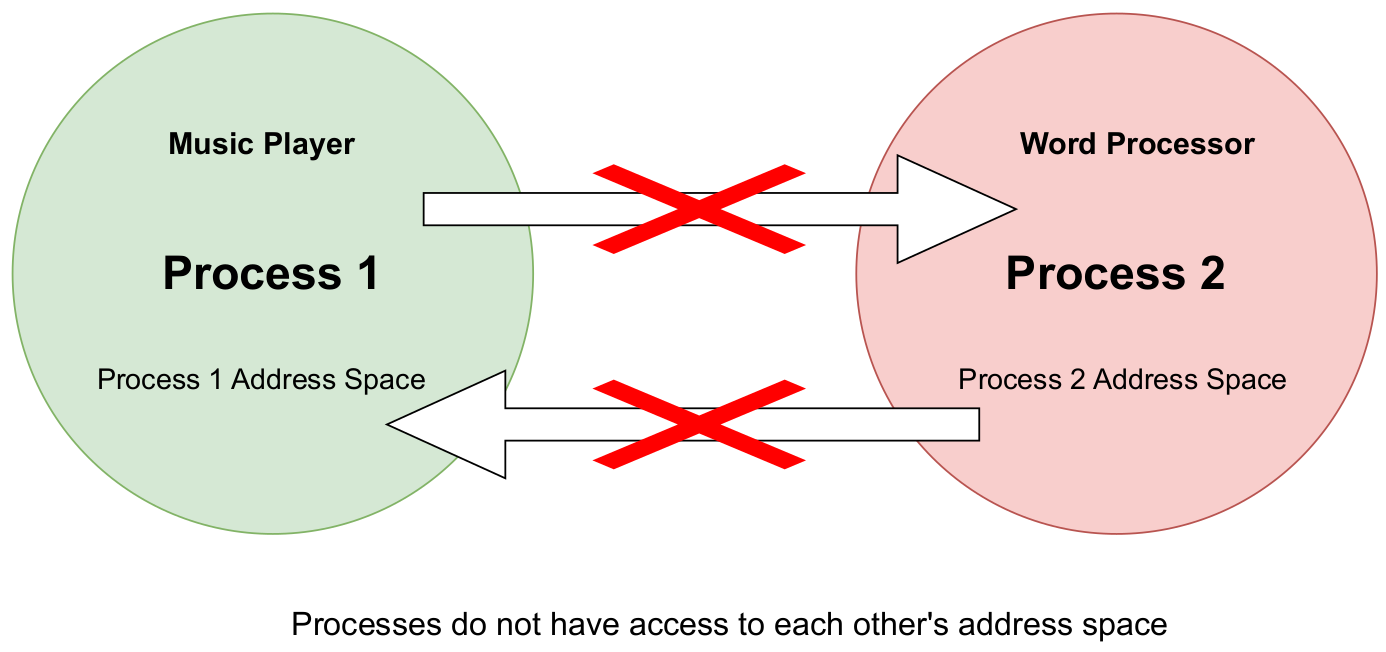
However, this approach has a limitation. Imagine you want the music player to automatically play a song title that you typed in the word processor. Can it do that? The simple answer is no—at least, not easily.
Why? Because the music player process has no awareness of what exists inside the word processor process. It’s as if each process is confined within its own territory, unable to access or interact with the other. In operating system terminology, this isolated territory is known as the address space or memory address space. Each process runs in its own protected memory space, preventing direct access from another process. While there are mechanisms like Inter-Process Communication (IPC) to enable data sharing, they introduce complexity and overhead. To overcome the limitations of data sharing in a multi-tasking or multi-process system, operating systems introduce threads. Unlike separate processes, which have their own isolated memory, threads in the same process share the same address space. This sharing makes communication between them much simpler. It is also more efficient. This allows multiple tasks within a single program to run concurrently while easily accessing shared data.
Understanding the Difference Between Threads and Processes
The main difference between multiple threads within a single process and multiple independent processes is how they handle memory. Threads in the same process share the same address space, meaning they can access the same data without restrictions. In contrast, independent processes each have their own separate memory space, making direct data exchange impossible. Since threads operate within a shared address space, communicating between them is much simpler compared to processes. For example, if the word processor and music player were threads of the same process instead of separate programs, they could easily share information—such as a song title—without needing complex communication mechanisms.
Another advantage of threads is that they are more lightweight than processes. Switching between threads within the same process is faster. It requires less CPU time and memory compared to switching between separate processes. This is because threads share the same address space, whereas processes need additional work to manage separate memory areas. As a result, multi-threading allows a program to handle multiple tasks more efficiently. It eliminates the overhead of creating and managing multiple processes.
Threads and Shared Memory: A Key Difference from Processes
In contrast to processes, threads exist within a single process and share the same address space (territory). This shared memory structure makes it significantly easier for threads within the same process to exchange data and communicate efficiently. Separate processes require complex inter-process communication (IPC) mechanisms to share data. In contrast, threads can directly access and modify shared variables.
Visualizing Threads in Address Space
Since all threads of a process operate within the same memory space, their representation in terms of address allocation would look something like this:

The diagram illustrates how threads within a single process share the same address space. Unlike independent processes, each having their own separate memory, threads operate within a common memory space belonging to their parent process. In this diagram:
- The process is represented as the outer boundary, encapsulating all threads.
- The shared memory (int var) is accessible to all threads, enabling them to communicate and exchange data efficiently.
- Thread 1, Thread 2, and Thread 3 can read and write to the same memory location, unlike processes, which require inter-process communication (IPC) to exchange data.
This fundamental characteristic of multi-threading enables faster communication. It also reduces overhead and improves CPU utilization. These benefits make it a key technique for optimizing performance in modern applications.
A program or process that contains multiple threads running inside it is known as a multi-threaded program. Unlike multi-processing, where separate processes operate independently, multi-threading allows multiple threads to execute within the same process. It enables efficient sharing of memory and resources.
How Do We Create Threads Inside a Process?
In C programming, one of the most widely used ways to create threads is through the POSIX-compliant pthread library. It is also highly portable. The pthread (POSIX threads) library provides a standardized set of functions. These functions allow developers to efficiently create threads. They also help manage and synchronize threads within a process. By using pthreads, multiple tasks can run concurrently within the same application. This improves performance. It also enhances responsiveness while maintaining control over thread execution.
In the next section, we will explore how the pthread library helps us create and manage threads. We will also include practical examples to demonstrate its usage.
Creating a Thread Using pthread_create()
The pthread (POSIX threads) library provides the function pthread_create() to create a new thread inside a process. This function allows a program to execute multiple tasks concurrently within the same address space, enabling efficient multi-threading.
Let’s walk through a simple “Hello World” multi-threaded program in C that creates a thread using pthread_create().
#include <stdio.h>
#include <stdlib.h>
#include <pthread.h>

// Function executed by the thread
void * thread_function() {
    printf("Hello from thread function!\n");
    return NULL;
}

int main() {
    pthread_t p1;  // Thread identifier
    int ret;

    // Creating a new thread
    ret = pthread_create(&p1, NULL, thread_function, NULL);
    if (ret != 0) {
        printf("Error occurred while trying to create pthread\n");
        exit(1);
    }
    printf("Bye from main\n");

    return 0;
}
The pthread_create() function is used to spawn a new thread inside the main process. If you’re looking for a more detailed explanation of its functionality, you can refer to the official documentation pthread_create().
However, there are a few key points to note:
- You must provide a thread identifier (in this case,
p1), which the system uses to track the newly created thread. - You must specify a thread function that defines what the thread will execute. In this example, the function
thread_functionsimply prints a"Hello"message to the screen.
At the moment pthread_create() is called, the thread function (thread_function) starts running asynchronously. Meanwhile, the main function continues its execution independently.
For the complete source code and detailed compilation instructions, please refer to the following GitHub repository:
🔗 Multi-Tasking with Pthreads – GitHub Repository
Now if we run this program we will see something like this:
./main_pthread_nojoin
Bye from main
Your output will most likely resemble the example above. But where is the “Hello from thread function!” message? We expected the thread to print it, yet it never appeared. This isn’t because the thread failed to run. Instead, it happens due to a timing issue between the main thread and the child thread. This brings us to an important aspect of pthreads: pthread_join. In the next post, we will explore how pthread_join helps resolve this issue in detail. We will ensure that threads complete their execution as expected.

 Tech For Talk
1 Comment