 by
by In a uni-processor system, true parallel processing does not exist. The term uni-processor itself signifies that there is only one CPU handling all computations. At any given moment, this single CPU can execute only one instruction. This is a fundamental limitation. It shapes how parallelism is achieved in such systems. Recognising this is crucial for understanding how modern operating systems and software simulate parallel execution on a single-core processor.
Background
Before diving into how parallelism works on a uni-processor system, it’s essential to grasp a few core programming concepts. These fundamentals lay the groundwork for understanding how a single CPU manages multiple tasks efficiently, even without true parallel execution.
Program
At its core, a program is simply a set of instructions written in code. Still, to run on a processor, a program must first be compiled into a binary executable file. This is a format the CPU can understand and execute.
To illustrate this, let’s consider the classic “Hello, World!” program. This fundamental example demonstrates how code is written, compiled, and executed, forming the foundation of all software applications.
#include <stdio.h>
int main()
{
    printf("Hello World\n");
    return 0;
}
When you compile and run the “Hello World” program on a system, the printf statement executes. It prints "Hello World" to the console. After completing its instructions, the program returns and exits, meaning it no longer occupies the CPU.
Now, let’s imagine a scenario where no other program or process is running on the machine. In this case, once our program exits, the CPU has nothing to execute. This state is known as the CPU being idle.
Understanding these terminologies is crucial for grasping parallelism in a uni-processor system. Here are two key terms to remember:
- Idle CPU: When no process is executing, the CPU is in an idle state.
- Process: In operating system terminology, a running instance of a program is called a process.
For now, we won’t dive deep into what a process is. Keep this in mind for later discussions on parallel execution.
Now, let’s move on to another fundamental concept—infinite loops in the context of parallelism.
🔗 Get the Source Code: You can find the full sample programs and setup instructions on GitHub. Feel free to download and experiment!
Infinite loop
Infinite loops play a crucial role in parallel computing. In our earlier example, the program exited after executing the printf statement, leaving the CPU idle. But what if we want the program to keep running indefinitely?
This is where an infinite loop becomes essential. It ensures that the program never exits, continuously executing instructions instead of relinquishing control of the CPU:
#include <stdio.h>
int main()
{
    while(1)
    {
        printf("Hello World\n");
    }

    return 0;
}
Now we have introduced the while(1) code into the program. The condition inside while(1) is always true, which means the loop never exits.As a result, the CPU continuously executes the printf statement, printing "Hello World"forever.The only way to stop this program is to manually terminate it. You can do this by pressing Ctrl + C. This action sends an interrupt signal to halt execution.
Why Does This Matter for Parallelism?
This simple concept—keeping the CPU busy with an infinite loop—is fundamental when discussing threads and parallelism. Later, we’ll explore how multiple such loops can run concurrently, simulating parallel execution even on a single-core processor.
Introducing Another Program
Now, let’s consider a second program, worker.cpp, which behaves similarly to our previous example but prints a different message:
worker.cpp
#include <stdio.h>
int main()
{
    while(1)
    {
        printf("Hello Boss\n");
    }

    return 0;
}
This program runs indefinitely because of the while(1) loop. The CPU keeps executing the printf statement, printing "Hello Boss" continuously. Just like before, you can terminate it manually by pressing Ctrl + C.
Running Multiple Programs on a Uni-Processor System
Now that we have two programs—main_infinite.c and worker.c—the natural question arises:
Can they run together on a single CPU?
The simple answer is no, because a uni-processor system can execute only one instruction at a time. However, through a mechanism called time-sharing, the system creates the illusion that multiple programs are running simultaneously.
The “Single Chair” Analogy
Think of a single chair and two people who want to sit. Since only one person can sit at a time:
- One person sits while the other waits.
- After a brief moment, they switch places—the waiting person sits while the other gets up.
- This switching happens so quickly that, to an observer, it appears as if both individuals are sitting simultaneously. It seems like they are both seated at once.
Now, let’s push this analogy further. What if this switching happens in milliseconds? Would you manage to see the difference with the naked eye? Absolutely not. The transitions would be so fast. It would appear as if both people are sitting at the same time. However, in reality, only one person occupies the chair at a time.
This is precisely how a single-core CPU manages multiple programs. It rapidly switches between tasks, assigning each one a tiny time slice. The speed of these context switches creates the illusion of parallel execution. However, the processor only handles one task at a time.
Pseudo Parallelism
This rapid switching between tasks is known as pseudo parallelism. Programs appear to run in parallel. However, they are actually executed one at a time.
How the CPU Handles Multiple Programs
This cycle repeats indefinitely, creating the illusion of simultaneous execution.
First moment: main_infinite.c runs while worker.c waits.
(Illustrated in Figure 1 of the PDF: main_infinite.c running, worker.c waiting)

Figure 1: main_infinite.c running worker.c waiting
Next moment: worker.c runs while main_infinite.c waits.
(Illustrated in Figure 2: worker.c running, main_infinite.c waiting)
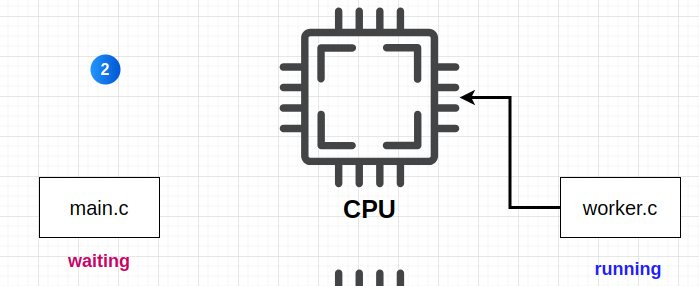
Figure 2: worker.c waiting running main_infinite.c
And this continues until one or both of them stops executing:

Figure 3: the big picture both the programs taking turns to execute their code on the CPU
Running Multiple Programs Simultaneously on a Ubuntu Machine
The below screenshot demonstrates two separate terminal windows running different programs:
Left Console (main_infinite) repeatedly prints "Hello World".
Right Console (worker) continuously prints "Hello Boss".
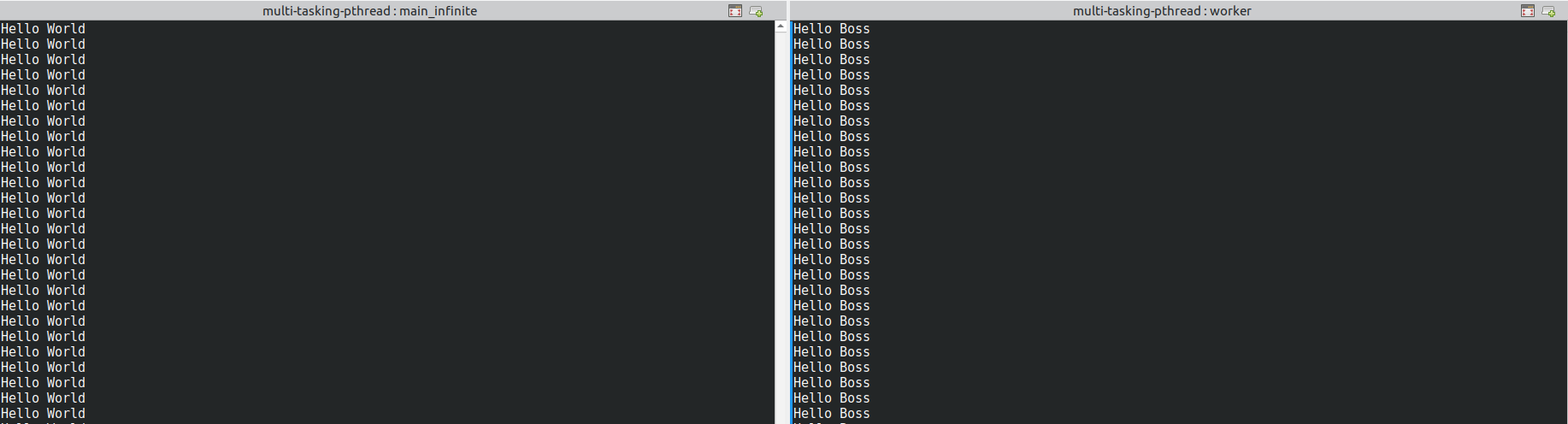
Even though these programs appear to be running simultaneously, a single-core CPU can only execute one instruction at a time. The illusion of parallel execution is created through context switching. The operating system scheduler rapidly alternates between both processes. It assigns each a fraction of CPU time.
Using top to Observe CPU Time-Sharing
We can use a popular command top to observe how these two programs are running in the single CPU. As seen in the following screenshot, top command output, both programs—worker and main_infinite—are actively running. However, a closer look at the CPU usage column reveals an important insight:
main_infinite is consuming 36.9% of the CPU.
worker is consuming 39.5% of the CPU.
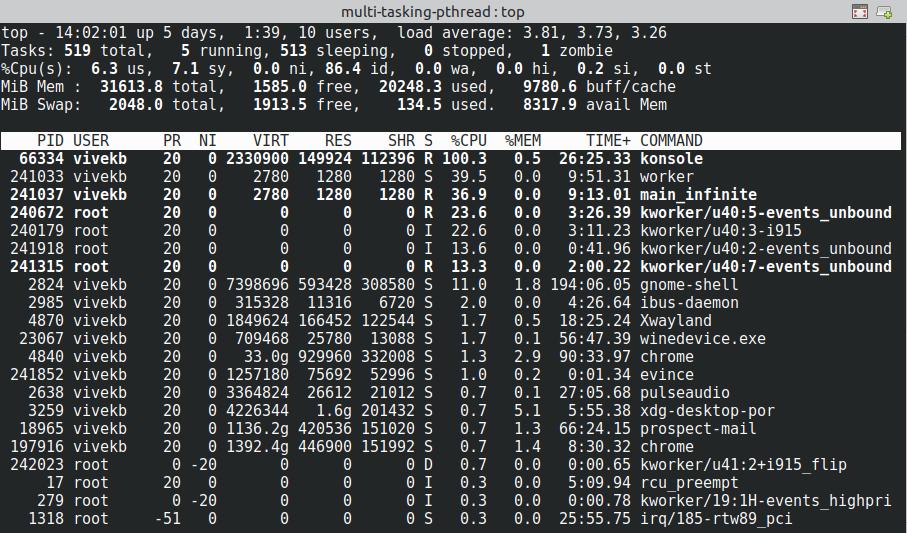
They may appear to be running simultaneously. However, the truth is they are taking turns. Each process occupies the CPU for a short period before switching.
Breaking the Myth of True Parallel Execution
- A single-core CPU can’t execute multiple tasks at the exact same time.
- This switching happens so quickly that it creates the illusion of simultaneous execution.
- Tools like
topallow us to see how CPU resources are being allocated in real time. This proves that each process is alternating execution. They are not truly running in parallel.
How Do Programs Share the CPU?
A natural question arises: How are these programs taking turns on the CPU?
Who ensures that both worker and main_infinite get a fair share of processing time? And what happens if one of them refuses to give up control?
The Role of the Operating System in CPU Sharing
The Operating System (OS) is responsible for managing CPU time between multiple processes. It ensures that no single program monopolises the CPU while others starve for execution time.
The specific piece of code within the OS that handles this is called the scheduler.
What is a Scheduler?
A scheduler is a crucial part of the OS that:
- Decides which process gets the CPU next.
- Allocates time slices (also known as time quanta) to each process.
- Ensures that every process gets a fair share of CPU time.
- Forcibly preempts (interrupts) a process if it runs beyond its allocated time slice.
Final Thoughts: CPU Time-Sharing, Not True Parallelism
The concepts of operating systems, schedulers, and process management are vast and intricate. However, diving deep into them is beyond the scope of this post. However, the single most important takeaway is:
On a single-processor system, there is no true parallelism. Instead, what we experience is CPU time-sharing, where the OS rapidly switches between processes, creating the illusion of simultaneous execution.
This CPU sharing mechanism is managed by the scheduler. It is a critical component of the Operating System. The scheduler decides which process runs next and for how long.
What’s Next? Moving Towards Multi-Threading
Now that we understand how multiple programs share a single CPU, a natural next step is to explore multi-threading:
- Why do we need threads?
- How do multi-threaded systems improve efficiency?
- How do threads help optimise CPU usage in modern applications?
The concepts discussed in this post serve as a foundation for our next deep dive into threads and multi-threading. In this, we’ll explore how to optimise performance within a single process.
Stay tuned!

 Tech For Talk
1 Comment