Skip to content

Tech For Talk

a blog site for programmers

  • M.Tech Cloud Computing – All Lesson Notes
    • Parallel and Distributed Computing
      • Introduction to parallel computing
      • Introduction to Distributed Memory Programming Using MPI
      • Parallel Processing: Best Data Partitioning Strategies for Maximum Efficiency
      • Understanding Parallelism in Uni-Processor Systems
      • Introduction to Multi-Threaded Programming: Key Concepts
      • Using Pthreads: Synchronization with pthread_join() Explained
      • Problems
        • Pthread
          • Building a Multi-Threaded Task Queue with Pthreads
          • Simulating a Flash Sale Using Pthreads in C
        • MPI
          • Efficient Data Aggregation with MPI_Reduce in Distributed Systems
          • Efficient Shipping Time Calculation Using MPI Techniques
          • Optimizing MPI Communication with Ping-Pong Patterns
          • Understanding Vector Multiplication in C: MPI Implementation
    • Cloud Computing
      • Introduction to Cloud Computing
      • Introduction to Virtualisation
      • Introduction to Containers
      • Introduction to Container Orchestration
    • Big Data
      • Introduction to Data Analytics, Big Data, Hadoop and Spark
      • Set Up a Hadoop Cluster on AWS EMR: A Step-by-Step Guide
      • Characteristics of Big Data Systems
    • Networking Fundamentals
      • Interpretation of RFC 2080: RIPng for IPv6
      • Software Defined Networking (SDN)
  • Blogs
    • Linux
      • WiFi Driver
      • SORACOM Onyx LTE USB Modem on Linux
      • How to add/compile a kernel module as a new buildroot package
    • Raspberry Pi
      • Bringing up Raspberry Pi 3 with NOOBS
      • Cross compiling custom Linux Kenel driver for Rasberry Pi Platform
    • Git
      • Setting Up Git for Windows: A Step-by-Step Guide
  • Online Tutorials
    • C++ Templates
      • Chapter 1
      • Chapter 2
      • Chapter 3
      • Chapter 4
      • Chapter 5
      • Chapter 6
      • Chapter 7
  • Contact Us
Posted on May 18, 2020November 21, 2025

Configure your AWS account

Unknown's avatar by vivekbhadra.In Cloud / AWS / DevOps.Leave a Comment on Configure your AWS account

In the last post I discussed about how to create your first AWS account for free. If you have missed it, you may like to check it here. Once you have created your AWS account and logged in, it is now time to configure your account. The AWS service related to this activity is called IAM (Identity and Access Management). In the console home screen, at the top left corner click on Services drop down list as below:
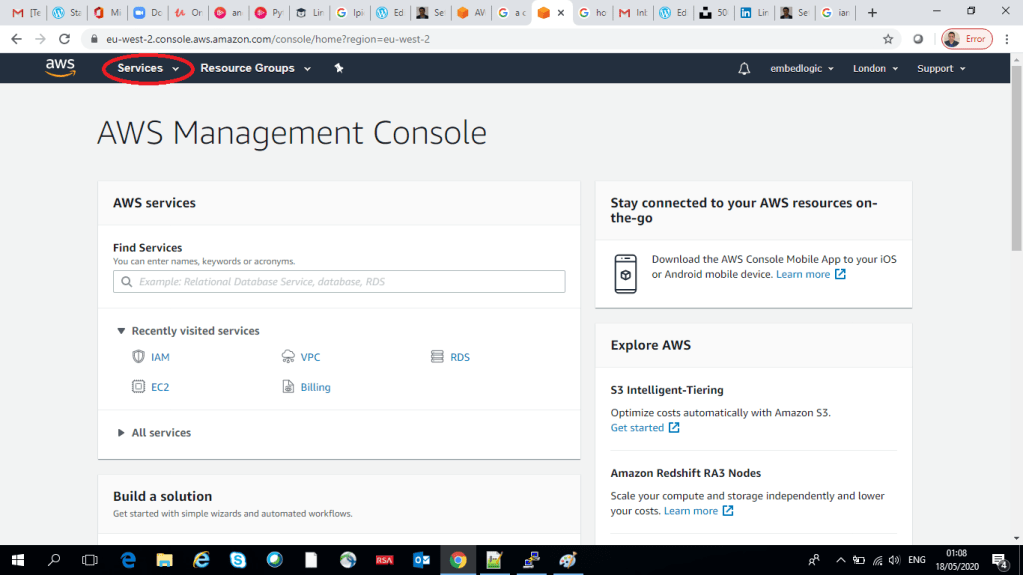
Scroll down and locate the Security, Identity and Compliance and then click on IAM.

Once you click on IAM it will take you to the IAM root account page as below:

Setup MFA for the root account

MFA or Multi-Factor Authentication provides a second level of security for the AWS root account. Click on the the drop down beside the Activate MFA on your root account

No you will see the Manage MFA button, click on it. On the next page click on Multi-factor authentication (MFA) as below:

Next, click on Activate MFA as below:
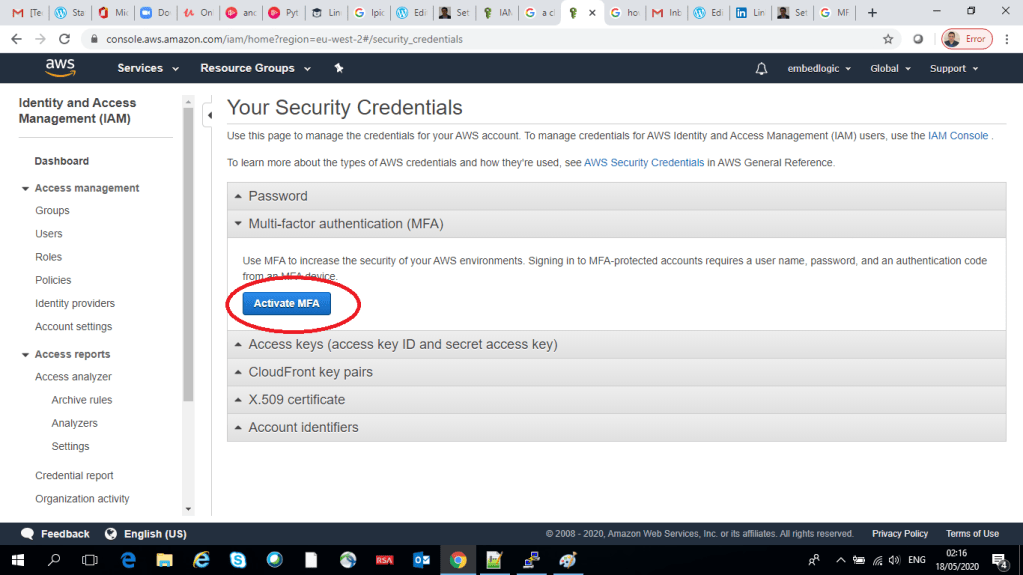
You will be presented with three options on the next page, keep the default selected option Virtual MFA device and click Continue.

On the next page there are two things to be done as below:

Install Google Authenticator

The first step is to download the Google Authenticator app on you mobile phone.

I use android phone, so for android go to the play store, download and install the Google Authenticator App. For iOS you have to download through AppStore. Once the app is downloaded and installed, open the app on you phone. Click on Get Started as shown below:

Once you click on Get Started, you should be able to see somewhat like a below screen on your phone:

Click on Scan a QR Code and it should look like the below, the scanner app will get activated. Now come back the AWS management console where you had left it. Now we will move to the second step.

Use your virtual MFA app and your device’s camera to scan the QR code

Click on the Show QR code as below:

Using you scanner app (which came up within the Google Authenticator just in the last step) read the QR code shown on the screen:

Just hold the phone in front of the screen (while the Google Authenticator Reader is open as in the last step). This should enable you to reader the QR code from the screen.

On the Setup Virtual MFA Device screen, scroll down and you should be able to see the below option:

You have to enter two consecutive MFA code in the above screen. So, open you MFA app on the phone. If you didn’t close it before, it should already be open and you should be able to see an MFA code on the mobile screen. Type in the MFA code displayed on the screen into the MFA code 1 box. Then wait for the MFA code to change in your Google Authenticator app. and once changed type in the new MFA code into the MFA code 2 box:

Now, click on Activate MFA button as in the below picture:

You should be able to see the MFA been activated for your root account.

Log out of your account and try to login back.

On the login page, select Root user, then type in your email id in the user name field and then click Next:
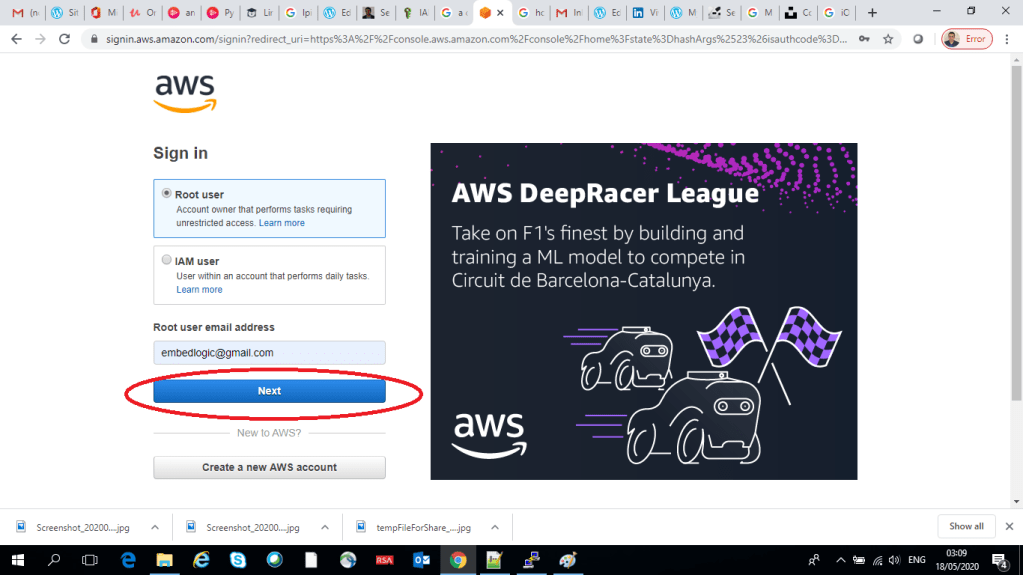
Now it will ask for your password code as in the below:
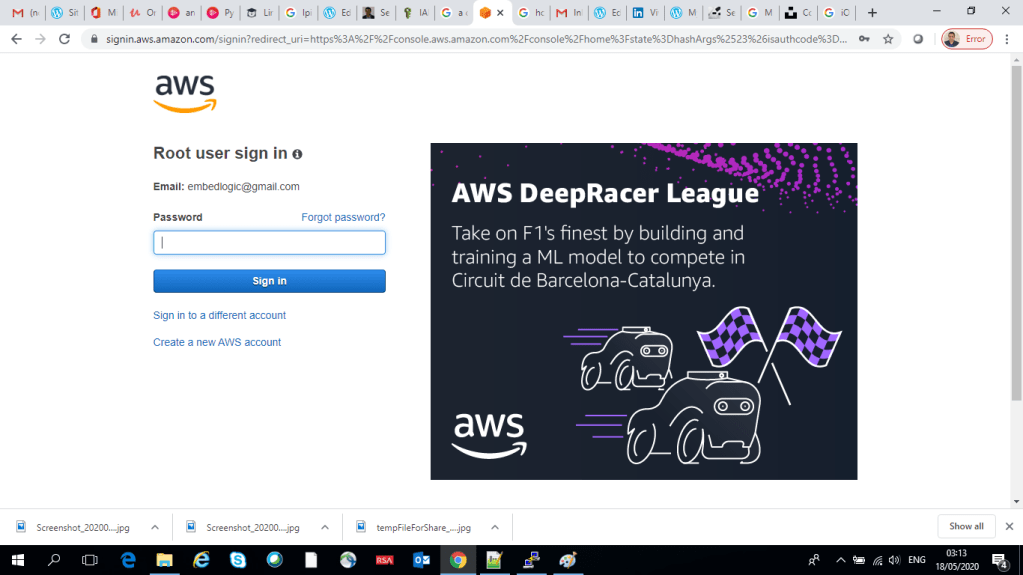
Type in your password and then click on Sign in. Now it will ask for your MFA code as below:

Open your Google Authenticator app on your phone again, it will display a code on the mobile screen. Type in the code into the above MFA code box and click on Submit. Now you should be able to log back into your AWS console home page again:
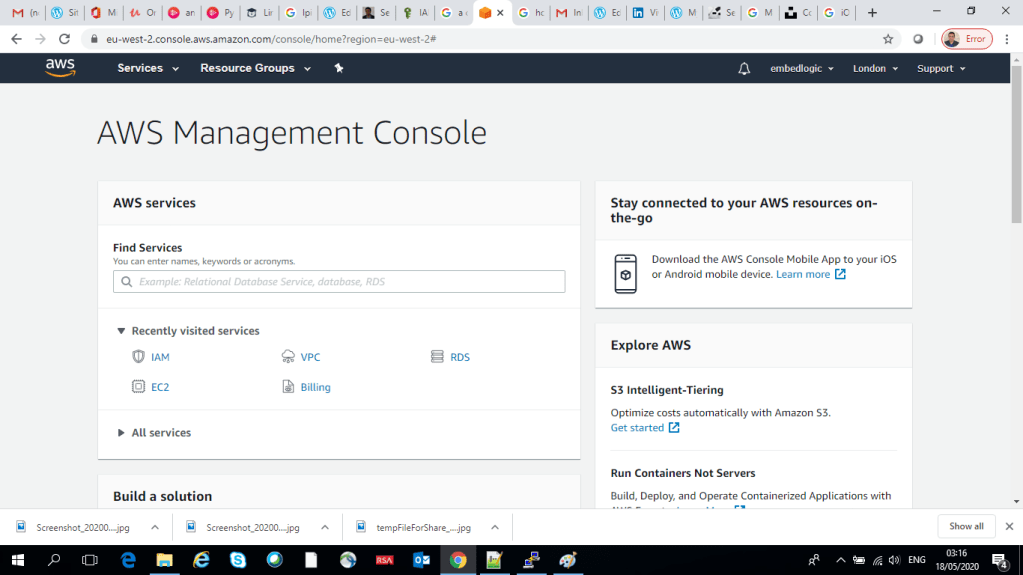
Now your MFA is set for the Root user account. Next we will setup an IAM user account in the next blog.

That’s all for this blog. Have fun!

Share this:

  • Click to email a link to a friend (Opens in new window) Email
  • Tweet
  • Click to share on Reddit (Opens in new window) Reddit
  • Pocket
  • Click to print (Opens in new window) Print
  • Share on Tumblr
Like Loading...

Related

AWSAWS Account SetupAWS Root MFA SetupMFA Setup

Leave a Reply Cancel reply

This site uses Akismet to reduce spam. Learn how your comment data is processed.

Post navigation

Previous Previous post: Setting up an AWS account
Next Next post: Guide to FONA Module Setup and Troubleshooting

Categories

  • Linux Kernel Development (45)
  • Cloud / AWS / DevOps (25)
  • C/C++ Programming (24)
  • Embedded Systems & IoT (19)
  • AI/ML & Data Engineering (16)

Tags

  • AWS (16)
  • Cloud (15)
  • technology (15)
  • C++ Programming (10)
  • ai (9)

Year

  • 2025 (657)
  • 2024 (2)
  • 2023 (47)
  • 2022 (1)
  • 2021 (14)

Recent Posts: Tech For Talk

BITS PILANI WILP Second Semester MTech in Cloud Computing Study Notes

BITS PILANI Assignments Second Semester M.Tech in Cloud Computing

Automating AWS Glue Workflows with EventBridge

Mastering DataOps: Orchestrating AWS Glue Workflows

Real-Time Data Pipeline Monitoring Using AWS Lambda

Top Posts & Pages

  • Home
  • How to Fix AWS SignatureDoesNotMatch Error
  • Mastering Function and Class Templates in C++: A Complete Guide
  • Chapter 4 : Return type of template function in C++
  • Chapter 7 : Class Template Instantiation
  • How to Configure AWS EC2 with NVIDIA GPU for CUDA Development
  • AWS EC2 Setup for GPU CUDA Programming
  • Chapter 1 : Introduction to Templates in C++
  • How to add Microsoft KM Loopback adapter in Windows 10
  • How to modify kernel command line
Follow Tech For Talk on WordPress.com

Copyright Notice

© [Vivek Bhadra] and [https://vivekbhadra.wordpress.com], [2017]. Unauthorized use and/or duplication of this material without express and written permission from this site’s author and/or owner is strictly prohibited. Excerpts and links may be used, provided that full and clear credit is given to [Vivek Bhadra] and [https://vivekbhadra.wordpress.com] with appropriate and specific direction to the original content.

Create a website or blog at WordPress.com
  • M.Tech Cloud Computing – All Lesson Notes
    • Parallel and Distributed Computing
      • Introduction to parallel computing
      • Introduction to Distributed Memory Programming Using MPI
      • Parallel Processing: Best Data Partitioning Strategies for Maximum Efficiency
      • Understanding Parallelism in Uni-Processor Systems
      • Introduction to Multi-Threaded Programming: Key Concepts
      • Using Pthreads: Synchronization with pthread_join() Explained
      • Problems
        • Pthread
          • Building a Multi-Threaded Task Queue with Pthreads
          • Simulating a Flash Sale Using Pthreads in C
        • MPI
          • Efficient Data Aggregation with MPI_Reduce in Distributed Systems
          • Efficient Shipping Time Calculation Using MPI Techniques
          • Optimizing MPI Communication with Ping-Pong Patterns
          • Understanding Vector Multiplication in C: MPI Implementation
    • Cloud Computing
      • Introduction to Cloud Computing
      • Introduction to Virtualisation
      • Introduction to Containers
      • Introduction to Container Orchestration
    • Big Data
      • Introduction to Data Analytics, Big Data, Hadoop and Spark
      • Set Up a Hadoop Cluster on AWS EMR: A Step-by-Step Guide
      • Characteristics of Big Data Systems
    • Networking Fundamentals
      • Interpretation of RFC 2080: RIPng for IPv6
      • Software Defined Networking (SDN)
  • Blogs
    • Linux
      • WiFi Driver
      • SORACOM Onyx LTE USB Modem on Linux
      • How to add/compile a kernel module as a new buildroot package
    • Raspberry Pi
      • Bringing up Raspberry Pi 3 with NOOBS
      • Cross compiling custom Linux Kenel driver for Rasberry Pi Platform
    • Git
      • Setting Up Git for Windows: A Step-by-Step Guide
  • Online Tutorials
    • C++ Templates
      • Chapter 1
      • Chapter 2
      • Chapter 3
      • Chapter 4
      • Chapter 5
      • Chapter 6
      • Chapter 7
  • Contact Us
  • Comment
  • Reblog
  • Subscribe Subscribed
    • Tech For Talk
    • Already have a WordPress.com account? Log in now.
    • Tech For Talk
    • Subscribe Subscribed
    • Sign up
    • Log in
    • Copy shortlink
    • Report this content
    • View post in Reader
    • Manage subscriptions
    • Collapse this bar
 

Loading Comments...
 

    %d